Using AI to Support Better Lesson Planning
AI can help educators create personalized lesson plans while reducing some of the time involved in planning. However, effective use begins before an AI tool generates anything. Educators need to define the teaching challenge, provide relevant context, review the results, and adapt the material to their students and classroom.
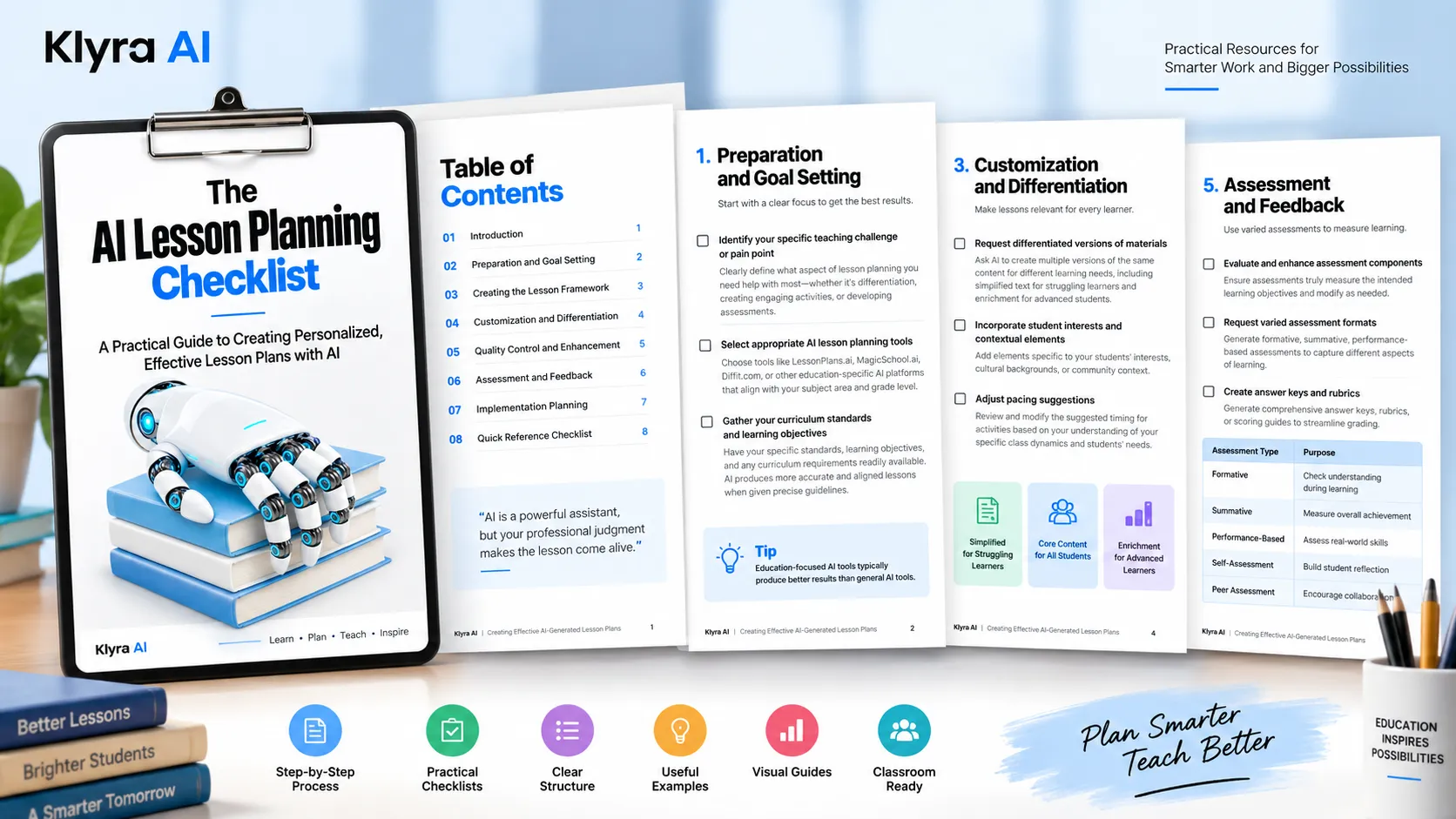
The AI Lesson Planning Checklist provides a structured process for moving from preparation to implementation. Its central approach is to use AI for planning support while maintaining professional judgment and control over the educational experience.
1. Start With the Teaching Challenge and Learning Goals
Before using an AI lesson planning tool, identify the specific part of lesson planning where support is needed. This might involve differentiation, creating engaging activities, or developing assessments. Defining the challenge first helps focus the AI output on the educator's actual need.
It is also important to gather the information that should guide the lesson. This includes relevant curriculum standards, learning objectives, and curriculum requirements. Providing precise guidelines and expectations helps the AI produce a lesson that is more closely aligned with the intended goals.
Choose an Appropriate AI Lesson Planning Tool
The checklist recommends considering education-specific AI platforms that align with the subject area and grade level. Examples provided in the resource include LessonPlans.ai, MagicSchool.ai, and Diffit.com. The resource notes that education-focused tools typically produce better results than general AI.
2. Build a Clear Lesson Framework
The quality of an AI-generated lesson plan depends significantly on the information included in the prompt. Rather than providing a vague request, create a clear and specific prompt that gives the AI the context it needs.
Useful prompt information includes:
- Grade level
- Subject
- Topic
- Learning objectives
- Timeframe
- Special considerations
The checklist also recommends asking AI for a complete lesson structure rather than isolated activities. A complete framework can include an introduction or hook, main instruction components, practice activities, and assessment strategies.
Align the Plan With Your Teaching Approach
Teaching methodology can also be included in the prompt. Educators can specify approaches such as inquiry-based learning, direct instruction, or project-based learning. This helps the generated plan better reflect the educator's teaching style and classroom culture.
3. Customize the Lesson for Different Learning Needs
An AI-generated lesson should not necessarily be treated as a single version for every student. The checklist recommends requesting differentiated versions of materials for different learning needs.
For example, educators can ask AI to create simplified text for struggling learners and enrichment materials for advanced students. This approach can reduce the time required to create differentiated materials manually.
Make Lessons More Relevant to Students
Personalization can extend beyond academic level. Educators can incorporate elements connected to students' interests, cultural backgrounds, or community context. Adding these contextual elements can make learning more relevant and support student engagement.
Use Professional Knowledge to Adjust Pacing
AI can suggest timing for lesson activities, but educators should review those recommendations against the realities of their specific classroom. The resource emphasizes that AI does not know the students or classroom dynamics in the same way the educator does.
Review and modify suggested pacing based on the educator's knowledge of the class and students' needs.
4. Review and Improve AI-Generated Content
AI-generated lesson plans require careful quality control. Educators should review factual information, concepts, and examples for errors or misconceptions before using the material with students.
The checklist also highlights the importance of reviewing content for potential bias, stereotypes, or culturally insensitive material. Professional judgment remains essential when creating appropriate and inclusive educational materials.
Add the Human Element
AI can provide a lesson framework, but educators can make the final material more authentic by adding their own teaching voice, classroom routines, personal examples, or anecdotes. These elements can strengthen connections with students and make the lesson better suited to the educator's classroom.
5. Strengthen Assessment and Feedback
Assessment should be reviewed alongside the rest of the lesson. Educators should check whether suggested assessments actually measure the intended learning objectives and modify them when necessary to align with their assessment philosophy.
The checklist recommends requesting varied assessment formats, including:
- Formative assessments
- Summative assessments
- Performance-based assessments
Using different assessment formats can help capture different aspects of student learning and accommodate various learning styles.
Create Answer Keys and Rubrics
AI can also assist with supporting assessment materials. Educators can ask AI to generate answer keys, rubrics, or scoring guides. These materials can help streamline grading while supporting consistent evaluation standards.
6. Prepare for Classroom Implementation
A lesson plan is only useful when it can be implemented effectively. Before the lesson begins, identify the physical or digital materials and resources required and make sure they are ready.
The checklist also recommends preparing a backup plan for technology issues or other implementation challenges. Alternative activities or approaches can help keep learning moving when technology does not work as expected.
Document What Works
Effective AI-assisted lesson planning can become easier over time when educators document what produces good results. Keep notes about the AI prompts, tools, and approaches that work best for different types of lessons.
This documentation creates a personal resource that can improve planning efficiency over time and provide a useful reference for future lesson development.
A Practical Workflow for AI-Assisted Lesson Planning
The checklist can be viewed as a six-stage workflow:
- Prepare: Identify the teaching challenge and gather curriculum standards and learning objectives.
- Build: Create specific prompts and request a complete lesson framework.
- Customize: Differentiate materials and incorporate relevant student and classroom context.
- Review: Check accuracy, cultural sensitivity, appropriateness, and alignment with your teaching approach.
- Assess: Review assessment components and create appropriate assessment formats, answer keys, and rubrics.
- Implement: Prepare materials, establish a technology backup plan, and document what works for future lessons.
This process keeps the educator involved throughout the lesson-planning cycle. AI supports the creation and refinement of materials, while the educator remains responsible for determining whether the final lesson is accurate, appropriate, aligned, and useful for the specific classroom.
Using the Checklist Before a Lesson
The resource is designed to function as a practical checklist rather than simply a collection of ideas. Before using an AI-generated lesson, educators can work through each stage to make sure the important planning decisions have been considered.
The most important principle is that AI-generated content should be reviewed and adapted rather than accepted without evaluation. The educator's understanding of the curriculum, students, classroom culture, teaching approach, and assessment needs remains an essential part of the process.
For the complete set of recommendations, use the downloadable AI Lesson Planning Checklist as a reference while preparing and refining AI-generated lessons.