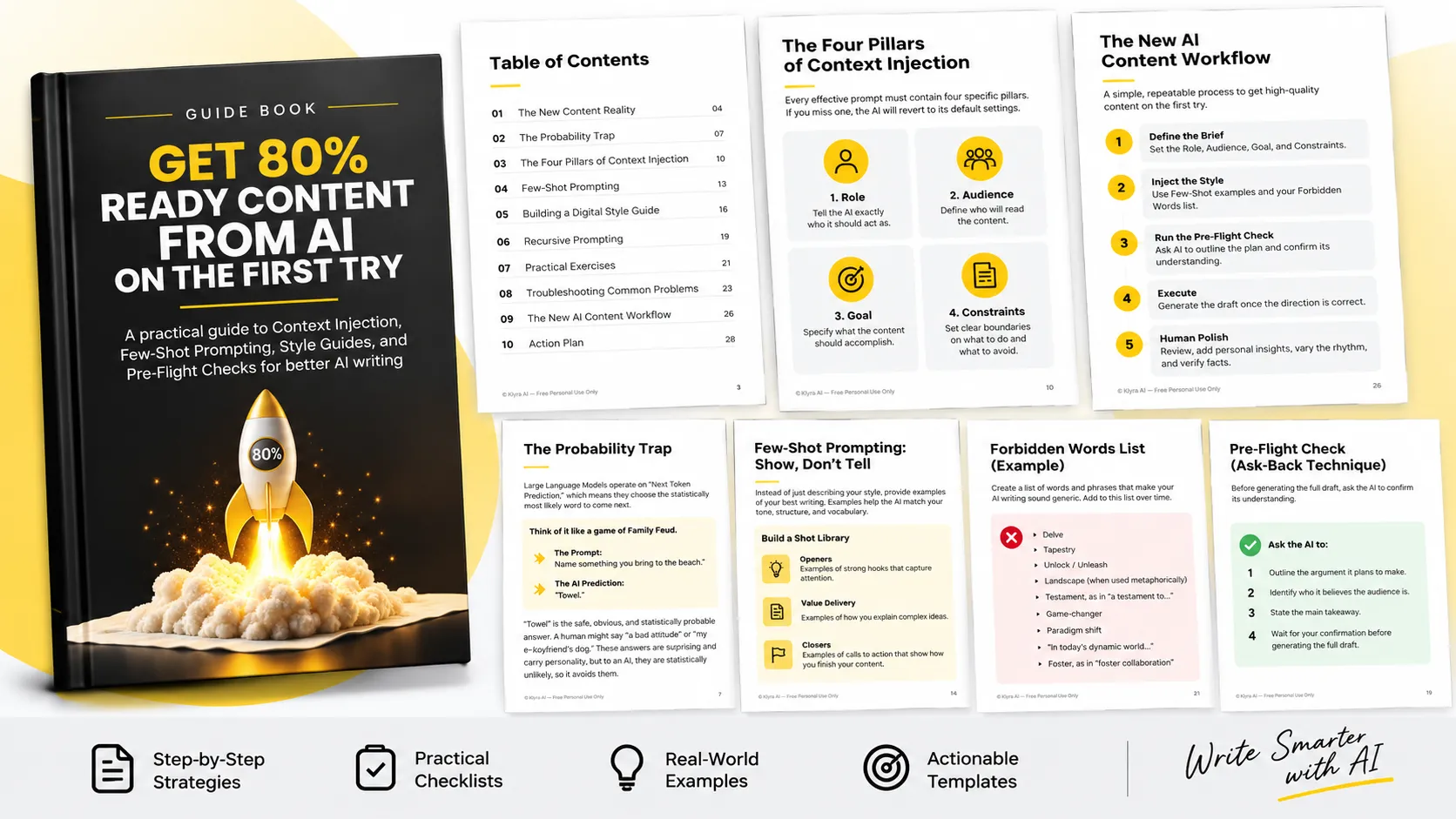
Get 80% Ready Content from AI on the First Try
AI has made producing grammatically correct text remarkably fast. Large language models can generate thousands of words in a short amount of time, which changes where value comes from in writing.
When producing more content becomes easy and inexpensive, simply producing more is no longer the advantage. The guide argues that the new scarcity is taste: knowing what should be said, how it should sound, who it should speak to, and what should be left out.
The people who get better results from AI are not necessarily the people who write the fastest prompts. They are the people who prepare the best context before asking the model to generate.
This approach is called Context Injection. Instead of giving AI a short instruction such as “Write a blog post about leadership,” you provide a detailed creative brief that narrows the direction before the writing begins.
Why AI Writing Often Sounds Generic
The Probability Trap
Large Language Models operate through a mechanism commonly described in the guide as Next Token Prediction. The model looks at the words provided and predicts what is statistically likely to come next based on its training.
This helps explain why AI can produce writing that is grammatically correct but predictable. When the instruction is vague, the model has to make more decisions on its own. It tends to move toward safe and familiar language.
The guide compares this to a game of Family Feud. If someone asks for something you bring to the beach, “towel” is an obvious and statistically probable answer. A human might provide a surprising or personal answer, while AI is more likely to select the safe response.
The result can be what the guide describes as Regression to the Mean: writing that is technically sound but lacks friction, personality, or a distinctive point of view.
Think of AI as a Junior Partner
A useful way to change the relationship with AI is to stop treating it as a magic wand and instead think of it as a highly capable but inexperienced junior partner.
This partner is extremely fast and has access to an enormous amount of information, but it does not automatically know your customers, your brand history, or your personal voice.
If you simply say, “Write an email to our customers,” the model has to guess what you mean. A detailed creative brief gives it the map it needs to move in the right direction.
The Four Pillars of Context Injection
The guide identifies four essential elements that should be included in an effective prompt: Role, Audience, Goal, and Constraints.
1. Role
Tell the AI exactly who it should act as.
Without a specified role, the model defaults to a general “helpful assistant.” That can be useful, but it does not necessarily produce a distinctive professional perspective.
For example, instead of asking AI to “write a post about sales,” the guide suggests defining a specific role such as a direct-response copywriter with experience in SaaS sales, along with a particular perspective toward traditional sales tactics.
The purpose is to give the model a clearer set of vocabulary, sentence structures, and professional patterns to draw from.
2. Audience
AI also needs to know who will read the content.
If you specify only “people who want to buy software,” the model has little information about the reader's knowledge, problems, or expectations. It may therefore explain basic concepts unnecessarily.
A more specific audience description gives the model a better understanding of what the reader already knows and what problems deserve attention.
The guide uses CTOs at mid-sized healthcare companies as an example. These readers may be technically knowledgeable while dealing with compliance challenges, meaning the content can move directly toward issues such as compliance, integration, and API stability instead of explaining basic terminology.
3. Goal
Every piece of content should have a specific outcome.
“Make it interesting” or “inform the reader” is too vague. The AI needs to understand what the content is supposed to accomplish.
The guide gives an example where the objective is to validate a reader's frustration about industry price increases and then position a solution as a cost-stable alternative, with the ultimate objective of booking a demo.
A clearly defined goal gives the AI a narrative direction. It knows where the content should begin and where it should finish.
4. Constraints
Constraints define what the AI must not do. The guide describes this as one of the most important ways to prevent generic or excessive writing.
Instead of saying only “keep it short,” provide specific rules.
- Do not use sentences longer than a specified number of words.
- Do not use selected generic or overused words.
- Keep paragraphs within a defined length.
- Do not use hashtags when they are not wanted.
Negative constraints give the model boundaries. The guide argues that AI models are particularly capable of following explicit restrictions, and that banning predictable language can encourage different word choices.
Few-Shot Prompting: Show, Don't Tell
Context alone has limits. Words such as “professional,” “witty,” or “friendly” can mean different things to different people, and AI has its own interpretation of these descriptions.
Few-Shot Prompting solves this by demonstrating the desired style rather than merely describing it.
Because LLMs are pattern-matching systems, examples can give the model a concrete pattern to follow. Instead of asking AI to “sound professional,” provide several examples of your own professional writing and ask it to follow the same characteristics.
The examples can communicate sentence length, vocabulary, rhythm, pacing, structure, and tone more precisely than adjectives alone.
Build a Shot Library
The guide recommends creating a Shot Library: a document containing examples of your best writing that can be reused in prompts.
Three useful categories are:
- Openers: Examples of strong hooks that demonstrate how you capture attention without relying on clickbait.
- Value Delivery: Examples showing how you explain complex ideas, including your preferred pacing and level of depth.
- Closers: Examples of calls to action that demonstrate how you prefer to finish a piece of content.
A few-shot prompt can then introduce several examples, explain what characteristics the AI should observe, and ask it to create a new piece of content using the same pattern.
The key principle is simple: instead of hoping the AI understands your voice from a description, give it examples that demonstrate the voice.
Create a Digital Style Guide
Manually repeating the Four Pillars and pasting examples into every prompt can become tedious. The guide recommends creating a Digital Style Guide to make the process easier to repeat.
The guide describes this as a block of instructions for the machine rather than a traditional document intended for human readers. Its purpose is to provide reusable context so AI can begin with a better understanding of how you want it to write.
Step 1: Run the Mirror Prompt
Before you can systematize your writing style, you need to define it.
The guide recommends taking three to five examples of your best writing and asking AI to analyze them as a linguistic analyst. The objective is not to summarize what the writing says, but to reverse-engineer how it is written.
The analysis should examine:
- Sentence structure, including average length, fragments, and rhythm.
- Tone and temperament, such as direct versus passive or serious versus playful.
- Vocabulary level, including conversational or academic language and jargon.
- Formatting habits, such as bullet points, bolding, and questions.
The resulting analysis becomes a specific Style Profile, or what the guide calls your “Style DNA.”
Step 2: Construct the Guide
The Style Guide should contain three main components.
- The Persona: Define who you are as a writer and how you approach writing.
- The Do List: Identify positive writing behaviors the AI should follow, such as short sentences, sensory metaphors, or directly addressing the reader.
- The Do Not List: Identify language, patterns, and behaviors the AI should avoid.
Step 3: Operationalize the Guide
The guide notes that modern AI tools such as ChatGPT and Claude provide features such as Custom Instructions or Project Knowledge.
The recommended approach is to place the Persona information in the area that asks what the AI should know about you, and place the Do and Do Not rules in the area describing how you want the AI to respond.
Once saved, this context can be available at the beginning of new chat sessions instead of being manually recreated each time.
Use Recursive Prompting Before Generating the Draft
Even with good context and examples, there is another risk: the AI can misunderstand an important part of the instruction and produce a long draft in the wrong direction.
The guide recommends Recursive Prompting to reduce this risk.
The Ask-Back Technique
Instead of immediately requesting the complete draft, first ask the AI to confirm its understanding.
The guide's pre-flight approach asks the AI to outline the argument it plans to make, identify who it believes the audience is, and state the main takeaway.
This creates an opportunity to catch misunderstandings before they become an entire draft.
For example, if AI interprets the audience as students when the intended readers are medical professionals preparing for board exams, the error can be corrected immediately.
Once the outline matches the intended direction, the full draft can be requested.
This turns the writing process from a single gamble into a quality-control process.
Practical Exercises
Exercise 1: Create a Forbidden Words List
The guide recommends creating a text file named Global_Negative_Constraints.txt.
Start with words and phrases that repeatedly make your AI-generated writing sound generic. The guide provides the following examples:
- Delve
- Tapestry
- Unlock / Unleash
- Landscape when used metaphorically
- Testament, as in “a testament to...”
- Game-changer
- Paradigm shift
- “In today's dynamic world...”
- Foster, as in “foster collaboration”
Add to the list whenever you notice AI using language that feels generic or predictable. The list can then be included at the end of significant prompts.
Exercise 2: Run a Sensory Audit
AI often defaults to abstract concepts such as efficiency and success. The guide recommends experimenting with more concrete, sensory language.
Take a previous AI-generated prompt and add an instruction requiring sensory details or physical metaphors for abstract claims.
Then compare the original and revised outputs. The purpose of the exercise is to observe how concrete details can make the resulting writing feel more humanized.
Troubleshooting Common AI Writing Problems
Problem 1: The Hallucination of Empathy
Symptoms: AI uses phrases such as “I understand your frustration” or “I care deeply about your success.”
Why it happens: The model is predicting language commonly associated with support agents. The result can feel manipulative because the reader knows the system does not literally have those feelings.
The fix: Add a constraint against fake empathy. Instead of claiming to understand or care, instruct the AI to demonstrate understanding by accurately describing the actual problem.
Problem 2: The Noise Floor
Symptoms: The writing is technically good but boring and resembles a press release.
Why it happens: The guide attributes this to insufficient opinion and the tendency of AI to regress toward the mean.
The fix: Use Hot Take Insertion. Explicitly instruct the AI to take a defined position instead of presenting both sides equally when a strong stance is intended.
Problem 3: The Metronome Effect
Symptoms: Sentences repeatedly have similar lengths, creating a monotonous rhythm.
Why it happens: AI tends to default toward medium-length, grammatically complete sentences.
The fix: Inject Burstiness. Ask the model to vary sentence structure by combining longer, more complex sentences with short sentences and fragments.
The New AI Content Workflow
The guide ultimately reframes the writer's role. Instead of simply typing words, the writer becomes a Creative Director managing a process.
- Define the Brief: Spend time establishing the Role, Audience, Goal, and Constraints.
- Inject the Style: Use Few-Shot examples and your Forbidden Words list if a Digital Style Guide has not already been configured.
- Run the Pre-Flight Check: Ask AI to outline the plan and correct misunderstandings about the audience, tone, or direction.
- Execute: Once the direction is correct, generate the draft.
- Human Polish: Review the draft and add the final layer of human judgment. Break repetitive rhythms, add personal anecdotes that AI could not know, and verify facts.
The guide emphasizes that even when content is approximately 80% ready, the human still contributes the final 20%. The objective is not to eliminate human work, but to make that work more valuable.
The Human Role Still Matters
The central idea behind the workflow is that AI can handle much of the mechanical work of producing a draft, but it cannot automatically supply everything that makes a piece of writing personally meaningful.
Human judgment remains important for direction, personal experience, connection, and fact verification.
Context Injection helps prevent the machine from diluting a specific message into generic background noise. The better the direction, examples, constraints, and quality checks, the closer the generated draft can move toward the intended result.
Action Plan
The guide concludes with four immediate actions.
- Run the Mirror Prompt: Select three pieces of your best writing, give them to AI, and ask it to analyze your writing style. Save the resulting Style Profile.
- Build Your Do Not List: Create a simple text file and begin collecting words and phrases that make your AI writing feel generic.
- Create Custom Instructions: Add your Persona and Style Rules to the relevant AI settings.
- Try the Pre-Flight Check: The next time you need an email or another piece of content, ask for the outline first rather than immediately requesting the draft. Correct the direction and then generate the content.
The final challenge is to create a prompt using the Four Pillars: Role, Audience, Goal, and Constraints. Choose a topic you know well, review the result, and refine the constraints if the output does not match your expectations.
Conclusion
The advantage of working with AI as a hybrid writer is not simply that less work needs to be done. The goal is to make the human contribution more valuable.
When you master Context Injection, you spend less time wrestling with spelling, grammar, basic structure, and the blank page. You can spend more time shaping the message, adding the experiences AI cannot know, and deciding what the final piece should say.
The guide's approach is therefore not about asking AI to replace the writer. It is about giving the machine a clear map, providing examples of the desired style, checking its direction before execution, and then applying human judgment to the final result.
The machine provides speed. The human provides direction, taste, context, and final judgment.