Building Better Chatbot Conversations
A chatbot often becomes one of the first interactions a visitor has with a business. That makes conversation design an important part of the customer experience. A chatbot may have access to useful information and automation, but its value depends on how effectively it guides people through an interaction.
The goal is not to make a chatbot handle everything. The guide recommends starting small and focusing on a specific conversation type that can be handled particularly well. From there, the chatbot can become more sophisticated as the business learns from real customer interactions.
An effective chatbot conversation should feel natural and helpful, anticipate common questions, guide visitors toward useful outcomes, maintain the business's brand voice, and provide a clear path to human assistance when the conversation requires it.
Step 1: Identify the Conversation Goal
Before writing chatbot messages, define what the chatbot is primarily expected to accomplish. Trying to make one chatbot perform every possible function can make the experience less focused and less effective.
Common Chatbot Use Cases
- Frequently asked questions: Provide immediate answers to common questions about business hours, locations, policies, services, and similar topics.
- Qualified lead capture: Collect contact information and relevant details from potential customers.
- Appointment scheduling: Help visitors select services, dates, and times without requiring phone or email exchanges.
- Product information: Help visitors understand offerings and identify products that match their needs.
- Basic customer support: Address common questions or issues involving existing products, orders, or services.
Choose the Best Starting Point
Customer communications can reveal which conversation type deserves attention first. Review recent customer interactions and identify questions or requests that occur repeatedly or follow predictable patterns.
The guide recommends evaluating potential conversation types using four factors:
- Volume: How frequently does the business handle this type of inquiry?
- Time investment: How much time does each interaction typically require?
- Business impact: How directly can the interaction contribute to business value?
- Complexity: How straightforward or variable is the conversation?
These factors can be combined into a simple scoring table. The highest-scoring opportunity can provide a useful starting point, particularly when it combines high volume, straightforward conversations, and meaningful business impact.
Define Success Before Building
Success should be connected to the business outcome the chatbot is intended to support. For example, an FAQ chatbot can measure how many common questions are answered without human intervention, while a lead-generation chatbot can measure visitor engagement and completed contact submissions. An appointment chatbot can focus on completed bookings.
The important principle is to measure outcomes rather than relying only on technical or engagement metrics. A chatbot can generate many interactions without necessarily creating meaningful value for the business.
Step 2: Map the Conversation Flow
Once the primary use case is clear, map the structure of the conversation before writing all of the individual responses.
Identify the Main Conversation Paths
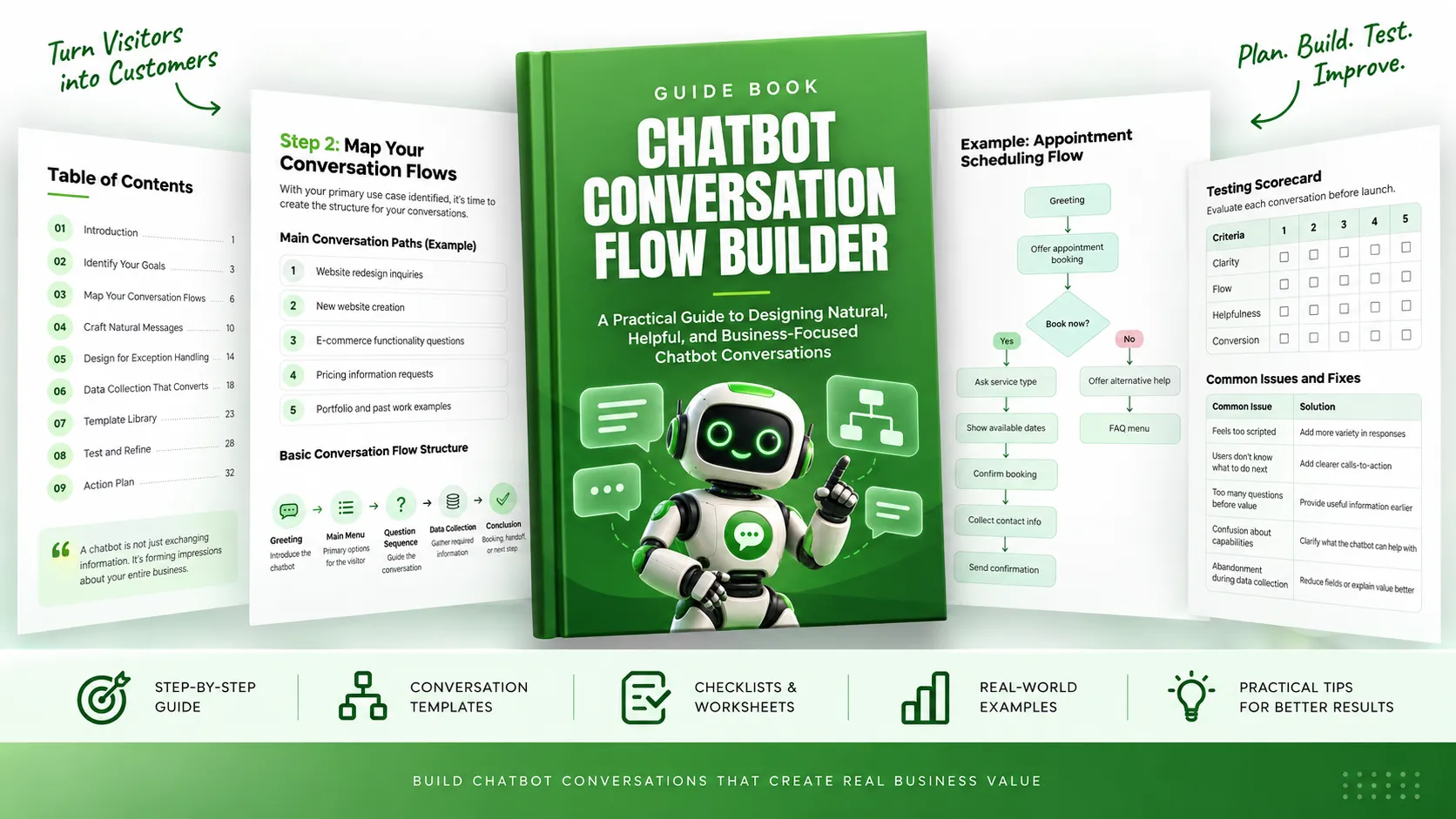
Start with three to five main paths that the chatbot needs to handle for its chosen use case. For example, a web design business focused on lead generation might separate conversations around website redesigns, new websites, e-commerce functionality, pricing, and previous work.
For each path, map the conversation from beginning to conclusion. A basic flow can include:
- Greeting: Introduce the chatbot and establish what it can help with.
- Main menu: Present the primary options available to the visitor.
- Question sequence: Guide the visitor through the relevant questions.
- Data collection: Gather information required to continue or complete the desired outcome.
- Conclusion: Finish with the appropriate action, such as an answer, booking, next step, or human handoff.
Use Visual Flow Diagrams
Visual mapping can make complicated conversations easier to understand before they are implemented. The guide suggests using different shapes to distinguish chatbot responses, decision points, user inputs, and data collection points.
Drawing the main flow on paper first can also expose logical gaps and unnecessary complications before time is spent building the conversation inside a chatbot platform.
Plan for Branches
Real conversations rarely remain completely linear. For each major flow, identify likely points where the visitor may need clarification, raise an objection, provide different details, or decide to leave the conversation.
For example, an appointment flow may need paths for visitors who want to reschedule, cannot use the available times, or need additional information before booking.
A useful chatbot anticipates these situations rather than forcing every visitor through the same rigid sequence.
Step 3: Craft Natural Conversational Messages
Once the structure is mapped, write the messages that visitors will actually see. This is where the chatbot's personality, clarity, and usefulness become apparent.
Start With a Useful Greeting
The opening message establishes the tone of the interaction. According to the guide, an effective greeting should introduce the chatbot, explain its primary value, and give the visitor a clear direction for what to do next.
A generic greeting places the responsibility on the visitor to determine what the chatbot can do. A stronger greeting makes the chatbot's capabilities clear and gives the visitor useful choices or a specific question to answer.
Keep the Conversation Natural
The guide recommends several techniques for avoiding robotic conversations:
- Use conversational language rather than formal document-style writing.
- Keep individual chatbot responses concise, generally around one to three sentences.
- Break complicated information into several shorter messages rather than presenting a large block of text.
- Ask one question at a time so the visitor is not overwhelmed.
Match the Brand Voice
A chatbot is an extension of the business, so its communication should reflect the existing brand voice. A formal business may use professional and precise language. A casual service business may use a friendlier conversational tone. A creative brand may use more expressive language.
One practical way to identify the appropriate voice is to review recent customer emails or social media responses and look for recurring words, phrases, and patterns in communication.
Build Logical Question Sequences
Questions should move the conversation forward while gathering information that has a clear purpose. A useful sequence can begin with a broad question and gradually move toward more specific details.
The guide recommends asking one question at a time, explaining the reason for information requests when appropriate, and providing response options when possible.
Every question should have a business purpose. If there is no clear reason for asking something, the question should be reconsidered or removed.
Step 4: Design for Exception Handling
Even carefully designed conversations will encounter unexpected inputs. Exception handling determines whether the chatbot can recover gracefully or leaves the visitor frustrated.
Prepare for Misunderstandings
Identify situations where the chatbot might misunderstand the visitor or where the visitor might misunderstand the chatbot. Prepare specific responses for these situations.
- Clarification responses: Rephrase or narrow a question when the answer is unclear.
- Correction options: Give the visitor a way to correct a misunderstanding.
- Recovery paths: Provide a route back to a useful part of the conversation.
Create Contextual Fallbacks
Generic fallback messages can make a chatbot feel limited. Instead, fallback responses should acknowledge the situation and offer useful next options, such as discussing services, pricing, or connecting with the team.
The guide recommends creating multiple fallback variations so that repeated misunderstandings do not produce the exact same response each time.
Plan Human Handoff Points
Not every conversation should remain with the chatbot. Human handoff points should be identified in advance.
- Complexity triggers: The topic is too nuanced for the chatbot to handle effectively.
- Emotional triggers: The visitor shows frustration or urgency.
- Value triggers: The inquiry represents a situation that deserves personal attention.
- Technical triggers: Multiple fallback or error states occur during the conversation.
The transition to a human should feel like a helpful next step rather than a failure. The chatbot can explain that the visitor's situation would be better handled by the appropriate team member and ask whether the visitor would like someone to follow up.
Step 5: Design Data Collection That Converts
Chatbot conversations can collect information that helps a business serve customers more effectively, but asking for too much information too early can create friction.
Four Data Collection Principles
- Establish value before asking: Explain what the visitor will receive or accomplish by sharing the information.
- Request only essential information: Avoid collecting unnecessary fields.
- Move from easy to sensitive information: Begin with simpler questions before requesting contact details.
- Provide context: Explain why a particular piece of information is needed.
Rather than presenting a long form at once, the guide recommends integrating information requests naturally into the conversation. The visitor can first receive useful value, answer a simple question, and then provide additional information as the conversation progresses.
Use Progressive Profiling
Progressive profiling means gathering information across multiple interactions rather than requesting everything in the first conversation.
- First interaction: Collect basic information such as name and email.
- Second interaction: Learn more about the visitor's specific needs.
- Third interaction: Gather more detailed qualification information.
This approach can help build trust without overwhelming visitors. Where the chatbot platform supports it, information from previous conversations can also be retained so returning visitors do not have to repeatedly provide the same details.
Lead Generation Flow Structure
The guide presents a lead-generation structure built around four stages:
- Hook: Start with a question connected to the visitor's likely need.
- Value building: Provide useful information that demonstrates relevant expertise.
- Micro-commitment: Ask for a small engagement before requesting contact information.
- Clear next step: Explain what will happen after the visitor provides the requested information.
The overall sequence moves from understanding the visitor's need toward providing value and then requesting the information needed for the next step.
Step 6: Implement, Test, and Refine
A conversation flow should be tested before it becomes publicly available. The guide recommends testing the chatbot from several perspectives rather than simply checking whether each message works individually.
Test Before Launch
- Role-play testing: Have team members act as customers and deliberately try different approaches.
- Scenario testing: Test each main conversation path using different inputs.
- Exception testing: Provide unexpected responses and observe how the chatbot recovers.
- Device testing: Review the experience on both desktop and mobile devices.
A testing scorecard can evaluate each conversation according to clarity, flow, helpfulness, and conversion. This creates a structured way to identify weaknesses before launch.
Common Problems and Fixes
- The conversation feels scripted: Add more variety to responses and acknowledgments.
- Users do not know what to do next: Add clearer calls to action and guidance.
- Too many questions appear before value: Provide useful information earlier.
- Visitors are unclear about chatbot capabilities: Explain what the chatbot can help with in the greeting.
- Visitors abandon data collection: Reduce the number of fields or explain the value of providing the information.
Improve Continuously
Launching the chatbot is the beginning of the improvement process. The guide recommends reviewing conversation logs and using actual interactions to identify patterns and problems.
- First month: Conduct weekly reviews to identify patterns and issues.
- First month: Make biweekly response updates and fix common problems.
- Ongoing: Perform monthly optimization based on metrics and targeted improvements.
Optimization should concentrate on high-volume conversation paths, abandonment points, fallback triggers, and conversion bottlenecks.
The underlying principle is that effective chatbots evolve through real user interactions rather than remaining unchanged after launch.
Essential Chatbot Conversation Templates
The guide includes templates that can be adapted to different business scenarios. These are frameworks rather than fixed scripts and should be customized to match the specific business and brand voice.
FAQ Response Flow
An FAQ conversation can answer the visitor's immediate question and then use a follow-up question to understand whether additional assistance is needed. For example, after answering a business-hours question, the chatbot can ask what the visitor is planning to visit for and offer relevant assistance.
Lead Capture Flow
A lead capture conversation can begin by identifying what brought the visitor to the website, provide information related to that need, ask a small engagement question, and then request contact information. After collecting the necessary details, the chatbot should clearly explain what the visitor can expect next.
Appointment Scheduling Flow
An appointment flow can begin by identifying the desired service, confirming relevant details, presenting available dates and times, and then collecting the information required to confirm the appointment.
Product Recommendation Flow
A product recommendation conversation can begin with the product category, identify what matters most to the visitor, and use that preference to narrow the available choices. The visitor can then choose whether to see more information, view other recommendations, or check availability.
Final Principles for Effective Chatbot Flows
Effective chatbot conversations are not primarily about sophisticated technology or clever wording. They are about understanding customer needs and creating pathways that genuinely help visitors while supporting the intended business outcome.
The guide highlights five principles:
- Focus on specific customer problems: Start with a focused use case rather than attempting to handle everything.
- Use natural language: Make the conversation sound appropriate for the brand and the way people communicate.
- Create logical question sequences: Guide visitors through useful steps while gathering information with a clear purpose.
- Handle exceptions gracefully: Prepare for unexpected inputs and provide useful recovery or human handoff paths.
- Improve continuously: Use actual conversation data to identify problems and refine the experience.
Action Plan
The guide's action plan provides a practical path from planning to ongoing optimization:
- Identify the primary use case by reviewing common customer interactions.
- Map the main conversation flow using paper or a digital flowchart.
- Write the greeting and first-level responses using conversational language that matches the brand.
- Create at least one complete conversation path from greeting through conclusion.
- Test the path with someone role-playing as a customer.
- Implement the conversation in the selected chatbot platform.
- Launch in a private or silent testing mode before public exposure.
- Review conversations daily during the first week after public launch.
- Make improvements based on actual user interactions.
The recommended starting point is deliberately simple: focus on quality over quantity and make one conversation type work well. As real customer interactions reveal new questions, exceptions, and opportunities, the chatbot can gradually expand and become more capable.