90-Day AI Implementation Roadmap
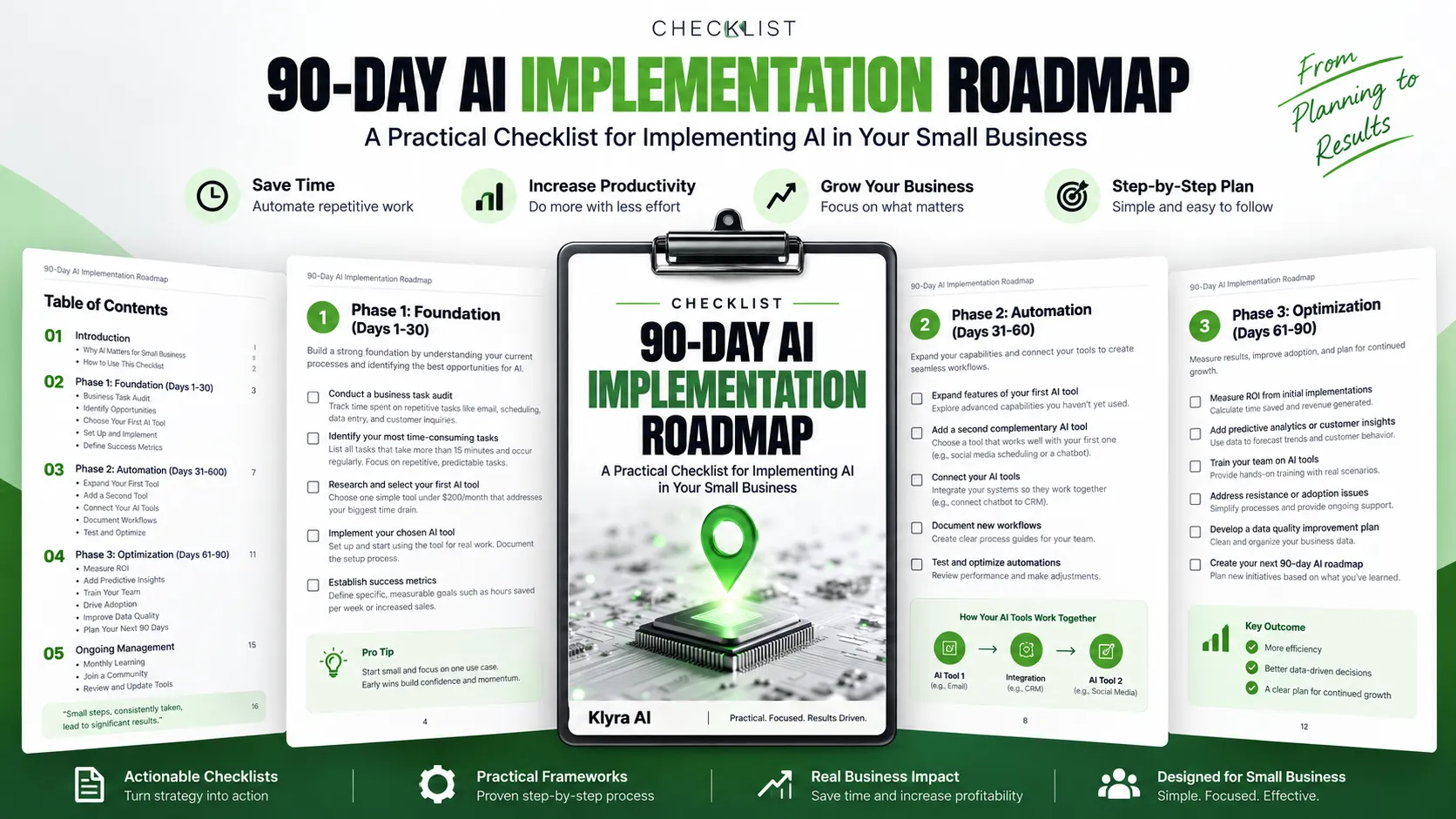
Implementing AI in a small business is easier to manage when the work is broken into clear stages. This roadmap provides a structured 90-day approach that starts with understanding where AI can help, moves into automation, and then focuses on optimization and continued improvement.
The roadmap is divided into three phases, followed by ongoing management activities. Each phase builds on the work completed before it, helping you move from identifying opportunities to putting AI into practical use.
Phase 1: Foundation | Days 1-30
The first 30 days focus on understanding your current business processes and selecting a practical starting point for AI implementation.
Conduct a Business Task Audit
Start by tracking how much time is spent on repetitive activities such as email, scheduling, data entry, and customer inquiries. Establishing a baseline helps identify where time is being consumed and which processes may be suitable for AI automation.
The goal is to understand the work that is already happening before deciding where AI should be introduced.
Identify Your Most Time-Consuming Tasks
List tasks that take more than 15 minutes and occur regularly. Give particular attention to repetitive and predictable activities that follow the same steps each time and could be handled by someone following clear instructions.
These characteristics can help highlight tasks that are potential candidates for AI implementation.
Research and Select Your First AI Tool
Choose one simple AI tool that addresses your biggest time drain and solves a specific business problem. The roadmap recommends starting with tools under $200 per month.
Beginning with one focused use case helps keep the implementation manageable while building confidence with the technology.
Implement the Chosen AI Tool
Set up the selected tool and begin using it for real business work. The roadmap emphasizes progress rather than waiting for a perfect implementation.
Document the setup process as you go. Keeping a record of how the tool was implemented can make future AI implementations easier.
Establish Success Metrics
Define specific and measurable goals for the implementation. Possible measures identified in the roadmap include hours saved per week, customer inquiries handled automatically, and increases in sales.
Clear metrics provide a way to compare results with the original baseline and determine the value of the AI investment.
Phase 2: Automation | Days 31-60
Once the first AI tool is in use, the second phase focuses on expanding its capabilities, introducing a complementary tool, connecting systems, documenting workflows, and improving automation.
Expand the Features of Your First AI Tool
Explore advanced capabilities that have not yet been used. The roadmap notes that many AI tools offer features beyond their basic functions that can further support productivity.
Add a Second Complementary AI Tool
Select another AI tool that works well with the first one. The source provides examples such as adding social media scheduling after implementing email automation, or adding a customer service chatbot.
The emphasis is on choosing a complementary capability rather than adding tools without a clear relationship to the existing workflow.
Connect Your AI Tools
Integrate AI systems so they can work together. For example, a chatbot can be connected to a CRM, or email automation can be connected to social media tools.
Connecting systems allows individual tools to work as part of a broader workflow rather than operating independently.
Document New Workflows
Create clear process guides that explain how work is completed with the new AI systems. Documentation helps everyone understand the updated procedures and work effectively with the tools.
Test and Optimize Automations
Review how automated systems are performing and make adjustments where necessary. Before progressing further, ensure that the workflows operate smoothly and address any integration issues that arise.
Phase 3: Optimization | Days 61-90
The final 30 days focus on measuring the results of the initial implementations, expanding AI capabilities, supporting adoption, and improving the quality of the information used by AI systems.
Measure ROI From Initial Implementations
Calculate the time saved and revenue generated by the AI tools you have implemented. Compare current measurements with the baseline established during the foundation phase.
This comparison helps quantify the impact of the implementation and provides information for deciding whether continued investment in AI is justified.
Add Predictive Analytics or Advanced Customer Insights
Consider tools that analyze patterns in business data to forecast trends and customer behavior. This represents a move from reactive business management toward a more proactive approach.
Train Your Team on AI Tools
Provide hands-on training using real business scenarios. The roadmap recommends positioning AI as a productivity partner that eliminates boring tasks rather than presenting it as a job threat.
Creating AI champions within the organization can also help team members support others as they learn to use the tools.
Address Resistance and Adoption Issues
If team members resist new AI-enabled processes, simplify the workflows and provide ongoing support. The objective is to make using the AI tools easier than the previous way of completing the work.
Celebrating successful outcomes publicly can also help encourage continued adoption.
Develop a Data Quality Improvement Plan
Review business data for information that is messy or incomplete and could limit AI effectiveness. The roadmap specifically highlights organizing customer information, cleaning email lists, and documenting processes.
Improving the quality and organization of this information creates a stronger foundation for AI performance.
Create Your Next 90-Day AI Roadmap
At the end of the first 90 days, use what you have learned to plan the next set of AI initiatives. Identify processes that still need automation and consider which new AI capabilities could support profitability.
Set clear goals and timelines for the next stage of continued AI implementation.
Ongoing AI Management
AI implementation does not end after the first 90 days. The roadmap includes several ongoing activities designed to help businesses continue learning and keep their AI systems aligned with their needs.
Schedule Monthly AI Learning Sessions
Set aside time each month to stay informed about AI updates that are relevant to the business. The roadmap recommends following trusted sources that focus on practical business applications rather than technical details.
Join an AI Business Community
Connect with other business owners who are using AI. Sharing experiences, successes, and mistakes can provide useful insights and support as your AI implementation continues.
Review and Update AI Tools Quarterly
Assess which tools are delivering results and which may need to be replaced. Because technology evolves quickly, regular reviews help businesses evaluate whether their current solutions remain effective for their needs.
How to Use the Roadmap
The checklist is designed to provide a structured sequence rather than encourage businesses to implement everything at once. Start by understanding where time is being spent, select a focused AI use case, measure the results, and then build from what works.
During the first phase, establish your baseline and implement your initial tool. During the second phase, expand and connect your AI systems. During the third phase, measure the impact, improve adoption, and strengthen the underlying data and processes.
After the 90-day period, continue the cycle by reviewing results, identifying remaining opportunities, learning about relevant AI developments, and creating the next roadmap.
The Complete Checklist
The downloadable 90-Day AI Implementation Roadmap turns this framework into a practical checklist that can be used to track progress across the full implementation period. Use it to keep your AI initiatives organized from the initial business task audit through automation, optimization, and ongoing management.