AI as a Teaching Assistant
Teachers manage a wide range of responsibilities every day, from planning lessons and designing assessments to differentiating instruction, communicating with parents, and supporting students. AI can assist with many of these tasks when it is given clear instructions and relevant context.
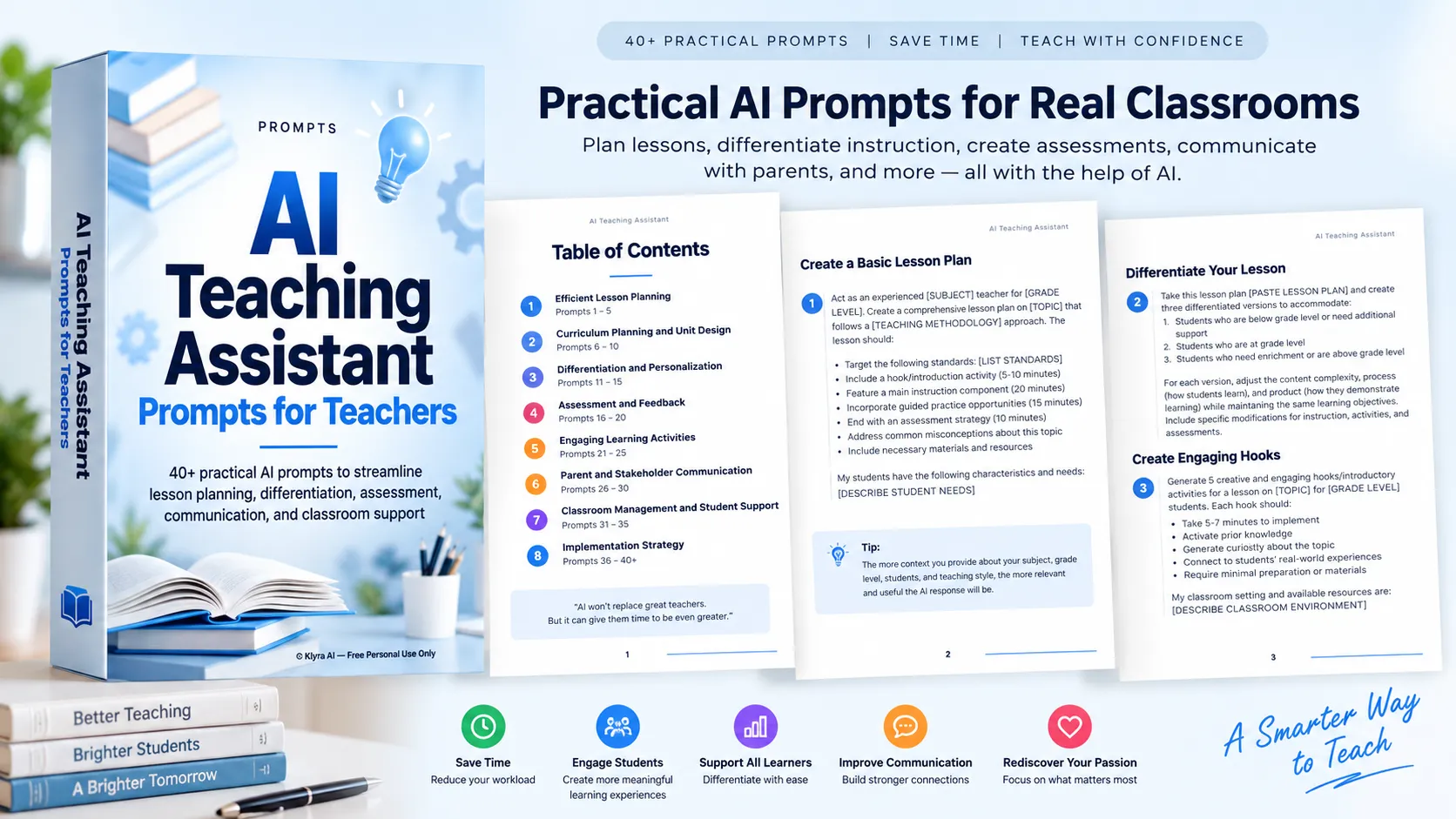
The AI Teaching Assistant guide provides a collection of carefully crafted prompts that teachers can use with an AI assistant to support specific teaching tasks. Rather than treating AI as a replacement for the teacher, the guide presents it as a tool that can help reduce workload and free up more time and energy for the parts of teaching that require professional expertise and human connection.
The prompts are organized by teaching goals, allowing educators to select prompts based on the challenge they are currently trying to solve.
Efficient Lesson Planning
Lesson planning is one of the areas where AI can help teachers structure their work more efficiently. The guide includes prompts for creating comprehensive lesson plans, differentiating existing lessons, generating engaging introductions, designing formative assessments, and developing discussion questions.
Create and Improve Lesson Plans
Teachers can provide the subject, grade level, topic, teaching methodology, standards, student needs, classroom environment, and available resources. The AI can then help structure a lesson around elements such as an introduction, main instruction, guided practice, assessment, misconceptions, and required materials.
Existing lesson plans can also be adapted into versions for students who need additional support, students working at grade level, and students who need enrichment. The objective remains consistent while the content complexity, learning process, and expected product can be adjusted.
Make Lessons More Engaging
Prompts can also be used to generate short introductory activities that activate prior knowledge, create curiosity, connect learning to real-world experiences, and require minimal preparation.
For classroom understanding, teachers can ask AI to create formative assessment strategies and discussion questions that progress from basic recall toward higher-order thinking, while also addressing misconceptions and encouraging student interaction.
Curriculum Planning and Unit Design
The guide extends beyond individual lessons into larger-scale curriculum planning. Teachers can use prompts to develop complete units, create standards alignment maps, design cross-curricular units, build learning progression maps, and adapt curriculum for specific student needs.
Plan Complete Units
A unit-planning prompt can organize a topic across a specified number of weeks or lessons while incorporating standards, progression of knowledge and skills, formative and summative assessments, teaching strategies, learning activities, and required resources.
Align Standards and Learning
Standards alignment prompts help break standards into the knowledge and skills students need to master. They can also suggest learning activities, assessment approaches, prerequisite skills, and connections to other subject areas.
Adapt Curriculum
Teachers can provide an existing curriculum unit and describe their students' characteristics and needs. AI can then help identify possible modifications to content, instructional approaches, materials, assessments, pacing, and sequence while maintaining the core learning objectives.
Differentiation and Personalization
Students have different levels of readiness, learning needs, and ways of demonstrating understanding. The guide includes prompts that help teachers create more personalized learning experiences while maintaining shared learning objectives.
For example, teachers can provide a text and request simplified, on-grade-level, and advanced versions while maintaining the same key information and concepts. They can also create tiered assignments that vary in complexity, structure, critical-thinking requirements, and expected products.
Other prompts support scaffolded questions, learning stations, and personalized learning plans. These approaches can help teachers structure additional support or enrichment around individual learning needs.
Assessment and Feedback
Assessment is another major area covered by the guide. Teachers can use AI to help develop rubrics, feedback templates, quick formative assessments, test blueprints, and peer feedback protocols.
Build Better Assessment Tools
Rubric prompts can be used to create student-friendly assessment criteria with four performance levels, aligned standards or objectives, content mastery components, and skill development components.
Teachers can also create short formative assessments that target specific learning objectives, require minimal materials, and provide information that can be used to adjust instruction.
Improve Feedback
Feedback prompts can help organize responses to common student work issues. The guide emphasizes identifying the issue, providing constructive guidance, suggesting specific improvements, reinforcing what was done well, and showing how work could be improved.
AI can also help structure peer feedback processes with clear instructions, guiding questions, feedback templates, respectful communication guidelines, and opportunities for students to reflect on the feedback they receive.
Engaging Learning Activities
The guide includes prompts for creating learning experiences that move beyond traditional instruction. Teachers can design project-based learning experiences, gamified activities, interactive simulations, real-world application activities, and digital learning experiences.
These prompts encourage teachers to define learning objectives while considering student engagement, choice, collaboration, critical thinking, problem-solving, accessibility, available technology, classroom constraints, and the time required.
Parent and Stakeholder Communication
Teachers can also use AI to support communication with parents and other stakeholders. The guide provides prompts for creating parent communication templates covering common situations throughout the school year.
These include beginning-of-year communications, progress updates, positive student achievements, upcoming units or projects, requests for volunteers or supplies, and end-of-year communication.
Additional prompts can help create classroom newsletters, student-led conference materials, curriculum night presentations, and classroom website content. The emphasis is on communication that is concise, informative, friendly, professional, and adaptable to the teacher's context.
Classroom Management and Student Support
AI can also assist teachers with organizing classroom procedures and support strategies. The guide includes prompts for routines such as starting class, transitioning between activities, collaborative work, distributing materials, using technology, finishing work early, and dismissing students.
Teachers can also develop templates for behavior support plans covering situations such as off-task behavior, disruptive talking, transition difficulties, work avoidance, and peer conflict. These plans can include triggers, replacement behaviors, intervention strategies, positive reinforcement, progress monitoring, and home-school communication.
Support Inclusive Classrooms
Prompts are provided for developing inclusive classroom strategies for English language learners, students with learning disabilities, students with attention difficulties, students from diverse cultural backgrounds, and students experiencing social or emotional challenges.
Teachers can ask for environmental modifications, instructional strategies, useful materials, peer-support approaches, and assessment accommodations appropriate to their context.
Support Student Motivation
The guide also addresses student motivation through strategies involving autonomy and choice, relevance to students' lives, recognition of effort and improvement, classroom community, and appropriately challenging learning experiences.
Using AI Effectively as a Teacher
The quality of an AI response depends significantly on the context provided. The guide recommends describing relevant information about the teaching situation, including grade level, subject, student needs, classroom environment, and available resources.
Teachers are encouraged to start small. Rather than attempting to change their entire workflow at once, they can begin by using AI for one specific task and gradually increase their use as they become more comfortable.
The guide also recommends saving successful prompts and refining prompts when the initial response does not meet expectations. Providing additional details or examples can make the resulting output more useful.
Using a consistent AI assistant and batching similar tasks can also make AI-assisted workflows more efficient. For example, several lesson plans or assessment materials can be developed during the same working session.
Professional Responsibility When Using AI
AI-generated educational content should always be reviewed before it is used with students. Teachers should check the content for accuracy, appropriateness, alignment with their teaching approach, and suitability for their students.
The guide places particular emphasis on student privacy and data security. Teachers should never share sensitive student information with AI tools.
Teachers should also review AI-generated content for potential bias related to race, gender, culture, or ability and make appropriate adjustments to support an inclusive learning environment.
Most importantly, professional judgment remains central. AI is presented as a tool that supports teaching rather than replaces the teacher's expertise or decision-making.
Building an AI-Enhanced Teaching Practice
Using AI effectively is an ongoing process. Teachers can begin with the areas that create the most workload or stress, experiment with relevant prompts, review the results, and refine their approach over time.
The goal is not to replace the teacher's unique talents or relationships with students. Instead, AI can help reduce repetitive work and free teachers to focus more of their time and energy on the human aspects of education.
As teachers become more comfortable experimenting with AI, they can develop their own collection of effective prompts and share successful strategies with colleagues. The complete guide provides a practical starting point for that process, with prompts spanning lesson planning, curriculum design, differentiation, assessment, learning activities, communication, classroom management, inclusion, and student motivation.
Download the Complete Guide
The complete AI Teaching Assistant guide brings these prompts together in one practical resource. Use it as a reference when planning lessons, adapting instruction, creating assessments, communicating with families, supporting students, and exploring new ways to incorporate AI into your teaching practice.
Start with one teaching challenge, choose a relevant prompt, provide the context the AI needs, and apply your professional judgment to the result.