A Practical Approach to AI Lesson Planning
Lesson planning can take up a substantial part of a teacher's available preparation time. Finding activities, adapting materials for different learners, creating worksheets, and preparing assessments can turn planning into a repetitive process. The 5-Step AI Lesson Planning Process presents a structured way to use artificial intelligence for these planning tasks while keeping the teacher's professional judgment at the center of the process.
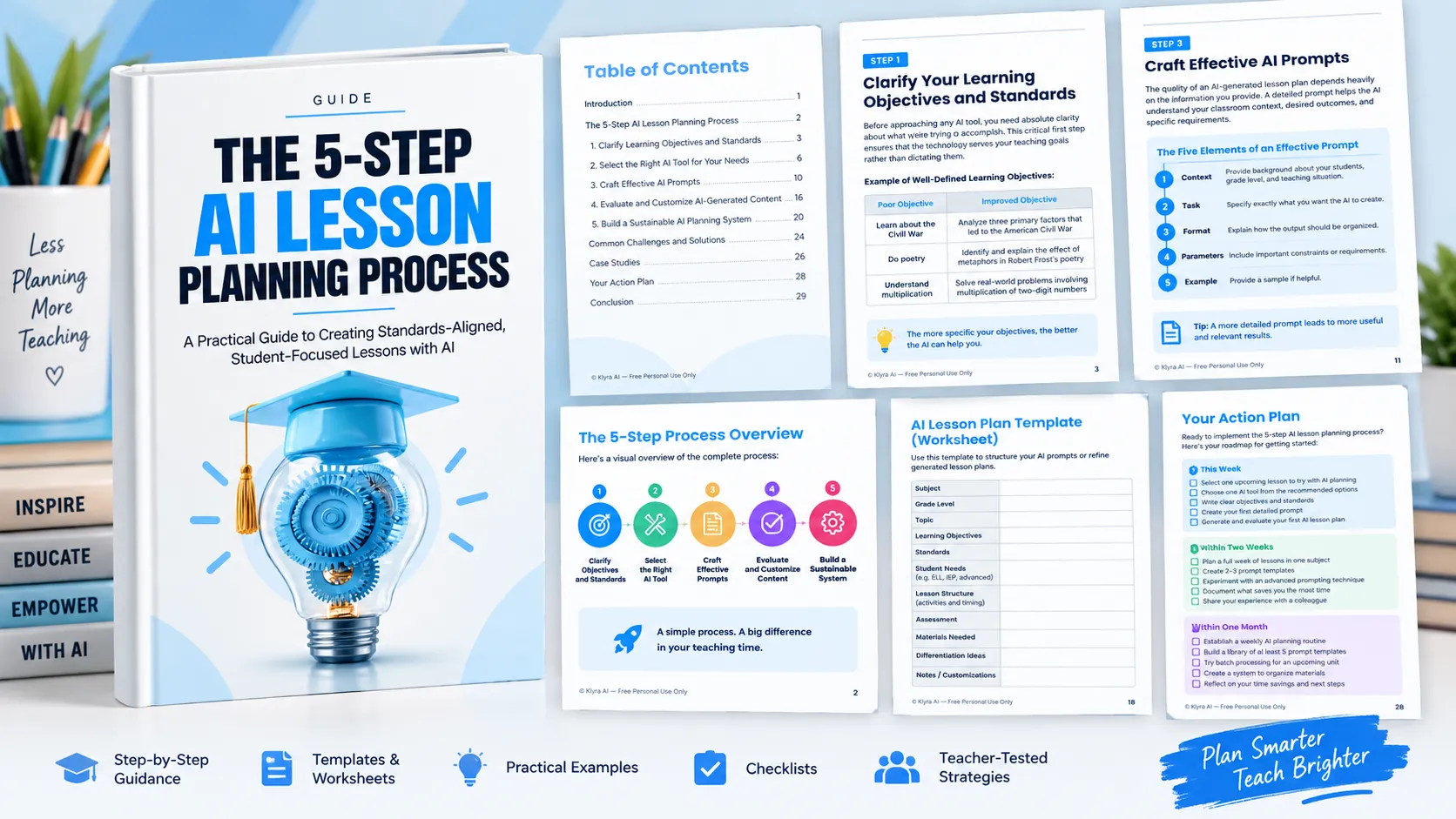
The process is built around five stages. Teachers first clarify what students need to learn, then select an appropriate AI tool, provide detailed instructions through effective prompts, evaluate and customize what the AI produces, and finally build repeatable systems that make the process more efficient over time.
The underlying principle is simple: AI can assist with the routine aspects of preparation, but the teacher remains responsible for determining whether the resulting lesson is accurate, appropriate, aligned, feasible, and suitable for the students in the classroom.
Step 1: Clarify Learning Objectives and Standards
The first step happens before opening an AI tool. Teachers need to be clear about what they want students to accomplish. Clear objectives give the AI a defined target and make it easier to evaluate the resulting lesson plan.
Define Specific Learning Targets
A useful learning objective describes what students should know or be able to do by the end of the lesson. The guide recommends avoiding broad objectives and replacing them with specific, observable targets.
For example, instead of simply asking students to learn about fractions, a more specific target could involve comparing and ordering fractions with different denominators. Similarly, a broad objective such as learning about the Civil War can be made more specific by asking students to analyze three primary factors that led to the American Civil War.
The guide provides similar examples for poetry and multiplication. The common principle is that greater specificity gives AI better information about the intended learning outcome.
Identify the Relevant Standards
Once the learning target is clear, identify the educational standards that the lesson needs to address. These may include Common Core, state standards, or other frameworks relevant to the school.
The guide recommends identifying one to three specific standards, copying their exact wording, and considering what evidence would demonstrate that students have met them. Having this information available allows the teacher to incorporate the standards directly into the AI planning process.
Consider Student Needs
A lesson plan should also reflect the students who will actually experience it. Before generating content, consider:
- Prior knowledge needed for the lesson
- Common misconceptions about the topic
- Students who may need additional support
- Opportunities for extension for advanced learners
The guide emphasizes that AI works better when it receives clear inputs. Organizing these details before prompting can reduce later revisions and help make the generated material more relevant to the classroom.
Step 2: Select the Right AI Tool
Different AI tools can support different parts of lesson planning. The guide groups them into three broad categories: general AI assistants, specialized education platforms, and subject-specific tools.
General AI Assistants
General AI assistants such as ChatGPT and Claude can provide flexible support across subjects. They can be useful for generating creative ideas, adapting existing materials, and developing lesson plans.
The trade-off is that general tools may require more specific prompting and may not include education-specific features.
Specialized Education Platforms
Education-focused platforms such as MagicSchool.ai, LessonPlans.ai, and Curipod are presented as options for standards-aligned content, education-specific templates, and built-in assessment components. Their specialization can be useful when a teacher needs capabilities designed specifically around education.
The guide also notes potential trade-offs, including subscription costs and a more specialized learning curve.
Subject-Specific Tools
Some tools focus more deeply on particular teaching needs. The guide gives Diffit.com as an example for differentiation and Quizizz as an example for assessment-focused work.
The important decision is not simply choosing the most feature-rich tool. Instead, consider which part of lesson planning consumes the most time and choose a tool that addresses that specific problem.
Match the Tool to the Planning Problem
The guide provides several examples of this approach:
- Creating differentiated materials: Diffit.com and Auto Classmate
- Generating engaging activities: Curipod and MagicSchool.ai
- Aligning with standards: LessonPlans.ai and Core Learning Exchange
- Assessment creation: Quizizz and MagicSchool.ai
For teachers who are new to AI, the guide recommends starting simple. A general AI tool can provide an opportunity to experiment with prompting, understand what AI does well, develop a workflow, and decide whether specialized tools are necessary.
Step 3: Craft Effective AI Prompts
The quality of an AI-generated lesson plan depends heavily on the information provided to the AI. A vague request may produce a generic plan, while a detailed prompt can communicate the classroom context, desired outcome, constraints, and structure much more clearly.
The Five Elements of an Effective Prompt
The guide identifies five useful components:
- Context: Provide background about the classroom, students, and teaching situation.
- Task: Specify exactly what you want the AI to create, such as a lesson plan, activity, or assessment.
- Format: Explain how the output should be organized.
- Parameters: Include important constraints or requirements.
- Example: When useful, provide a sample showing what you are looking for.
A basic lesson-planning prompt can identify the grade level, subject, topic, learner characteristics, requested content, requirements, standards, and desired format. This creates a much clearer starting point than simply asking an AI tool to create a lesson plan.
Use Advanced Prompting Techniques
As teachers become more comfortable, prompts can become more specific. The guide recommends several techniques.
Specify the learning sequence. Ask the AI to structure the lesson around defined stages and time allocations, such as an activating strategy, direct instruction, guided practice, and assessment.
Request multiple options. Asking for several approaches allows the teacher to compare alternatives and select the one that best fits the class and teaching style.
Include differentiation requirements. Prompts can request modifications for English Language Learners, struggling readers, and advanced students.
Request connected materials. Instead of requesting only a lesson plan, ask the AI to create related resources such as a worksheet and exit ticket.
Refine Rather Than Restart
Prompting can be an iterative process. If the first response is not suitable, the guide recommends giving the AI specific follow-up instructions to make the content more detailed, add a missing element, or adjust the complexity for a particular grade level or ability.
Building on an initial response can be more efficient than starting over with an entirely new prompt.
Step 4: Evaluate and Customize AI-Generated Content
An AI-generated lesson plan should be treated as a starting point rather than a finished product. The teacher's professional expertise is essential for determining whether the content is accurate, aligned, appropriate, feasible, and genuinely useful for the students.
Check Accuracy
Review factual information carefully. Look for errors, misconceptions, and explanations or examples that may not align with appropriate teaching practices.
Verify Alignment
Check whether the lesson genuinely addresses the stated standards and learning objectives. The activities should contribute toward the intended learning targets, and the assessment should measure what students are expected to learn.
Assess Appropriateness
Consider whether the content is appropriate for the students' age and current abilities. The guide also recommends considering whether the lesson is culturally responsive and inclusive.
Review Feasibility
A lesson can look effective on paper and still be impractical in a real classroom. Consider whether the required materials and technology are available and whether the proposed timing is realistic.
Make the Lesson Your Own
After evaluation, customize the AI-generated content using knowledge of the specific classroom. The guide suggests adding examples connected to students' interests or community, incorporating established classroom routines, connecting activities to previous learning, and adjusting vocabulary to match language already used with students.
Differentiation can also be strengthened by modifying activities for students who need support, adding alternative approaches, creating additional challenges for advanced learners, and incorporating specific scaffolds.
Engagement can be improved by adding movement opportunities where appropriate, incorporating the teacher's own style and personality, using familiar classroom references, and adding visual supports that are known to work with the students.
Use a Practical Customization Exercise
- Choose one activity from the AI-generated lesson plan.
- Identify three to five ways to tailor it to the students.
- Rewrite the activity using those customizations.
- Compare the original AI-generated version with the customized version.
This process turns a generic starting point into something more closely connected to the actual classroom.
Complete the Quality Control Check
Before implementing the lesson, the guide recommends four final checkpoints:
- The Reality Test: Mentally walk through the lesson and consider whether it will work with the specific students and classroom.
- The Engagement Gauge: Consider whether the lesson is likely to capture and maintain student interest.
- The Objective Alignment: Check whether students will be able to demonstrate the intended learning targets.
- The Values Check: Determine whether the plan reflects the teacher's instructional philosophy and priorities.
The purpose of quality control is not to make the AI output perfect. It is to make the lesson authentic to the teacher and appropriate for the classroom.
Step 5: Build a Sustainable AI Planning System
The long-term value of AI lesson planning comes from integrating it into an existing workflow rather than treating each lesson as an isolated experiment.
Establish a Planning Rhythm
The guide presents several ways to structure AI-assisted planning.
Weekly planning blocks can be used to reserve a specific period for AI-assisted planning, generate multiple lessons together, and refine the resulting plans.
Daily quick updates can involve spending a short period reviewing the following day's plan and making adjustments based on what happened in class.
Long-term planning can begin with initial unit planning at the start of a quarter. Teachers can generate lesson skeletons for an entire unit, refine them over time, and maintain a lesson bank of AI-generated options for future use.
Build a Prompt and Template Library
Reusable prompts can make future planning more efficient. The guide recommends creating templates for frequently used lesson types and classroom activities.
Examples include:
- Math lessons with problem sets and visual models
- Reading lessons with before, during, and after reading activities
- Science lessons with inquiry questions and experiment protocols
- Morning meeting or bell-ringer activities
- Transition activities between subjects
- End-of-day reflection prompts
- Exit tickets aligned with daily objectives
- Quick formative assessments
- Project rubrics and feedback forms
The guide recommends identifying three to five frequently used lesson types, creating detailed prompt templates for them, testing and refining those templates, and storing the best versions somewhere accessible.
Use Batch Processing
Generating related materials together can further streamline planning. For a unit, teachers can generate multiple lesson plans in one AI session, request connected materials, and create a progression in which skills build on one another.
Material sets can include lesson plans, slides, worksheets, homework, and assessments. Teachers can also request differentiated versions simultaneously and create parent communication materials that align with lesson content.
Batch planning can also be applied to seasonal work, emergency substitute plans, and review materials for end-of-unit or testing periods.
Create a Continuous Improvement Loop
The guide recommends maintaining a prompt journal to document which prompts produce the best results, which phrases improve AI outputs, and which types of content the AI handles well or poorly.
Regular reflection can focus on which AI-generated activities engaged students most effectively, which parts of plans typically require the most customization, and how much time the overall process is actually saving.
Improvement does not need to happen all at once. The guide recommends trying one new AI planning technique each week, gradually increasing the complexity of requests, and experimenting with different tools for different planning needs.
Overcoming Common AI Lesson Planning Challenges
A structured process does not eliminate every challenge. The guide identifies several common problems and practical responses.
Generic or Bland Content
When AI-generated content feels generic, provide more information about the teaching style, explicitly request creative approaches, connect the lesson to current events or student interests, and use follow-up prompts to make the content more engaging.
Inaccurate or Outdated Information
AI-generated content should be fact-checked, particularly in areas such as science and history. The guide recommends providing current sources or references in prompts and specifying recent developments when they are relevant.
Technology Limitations
Teachers can prepare for internet outages by keeping successful prompts and outputs available for offline reference and maintaining a small collection of non-AI lesson plans for emergencies. The guide also suggests considering AI tools that can operate without constant internet access.
Privacy and Security
Before using AI tools, review the school's policies. Avoid entering identifiable student information into public AI systems. Where appropriate, use education-specific tools with stronger privacy protections and sanitize classroom examples before entering them into AI systems.
School Requirements
If the school requires a particular lesson plan format, incorporate that template into the AI prompt. Teachers can also specify the elements required by administration and maintain transparency with supervisors about how AI tools are being used.
AI Overwhelm
Teachers do not need to adopt every AI capability at once. The guide recommends starting with one subject or one lesson type, focusing first on the most time-consuming planning tasks, scheduling specific times for AI work, and connecting with other educators using AI for support and advice.
From Individual Experiments to a Repeatable Workflow
The guide's case studies illustrate how teachers can build an AI planning workflow gradually.
Sarah, a middle school science teacher, used different tools for different needs. General AI helped her generate creative lab activities, Diffit.com helped create versions of reading materials at different levels, and Quizizz helped generate formative assessments. By matching tools to specific pain points, the guide reports that she reduced her planning time by more than 60 percent.
Michael, a fourth-grade teacher, began with AI planning for math lessons and created a template that consistently produced useful starter plans. He later expanded the approach to science and reading. He established a Thursday afternoon AI planning block for the following week and used Monday mornings to review and adjust plans based on the previous week. The guide reports that this system saved him approximately five hours of planning time each week, which he redirected toward more detailed feedback on student work.
These examples reinforce the broader approach of starting with a manageable use case, learning what works, creating reusable templates, and gradually expanding the system.
Your AI Lesson Planning Action Plan
The guide provides a practical progression for putting the process into practice.
This Week
- Select one upcoming lesson to plan with AI.
- Choose one AI tool from the recommended options.
- Write clear objectives and standards for the lesson.
- Create a detailed prompt using the guide's framework.
- Generate the lesson plan and evaluate it.
Within Two Weeks
- Expand AI-assisted planning to a full week of lessons in one subject.
- Create two or three specialized templates for different lesson types.
- Experiment with at least one advanced prompting technique.
- Document which approaches save the most time.
- Share the experience with at least one colleague.
Within One Month
- Establish a weekly AI planning routine.
- Build a library containing at least five effective prompt templates.
- Try batch processing for an upcoming unit.
- Create a system for storing and organizing AI-generated materials.
- Reflect on the time being saved and how that time can be reinvested.
Ongoing
Continue refining prompts based on classroom results, update the template library with successful formats, experiment with new AI tools, and maintain a balance between AI efficiency and personal teaching style.
The Role of the Teacher in AI-Assisted Planning
The central message of the process is that AI should support teaching expertise rather than replace it. AI can assist with speed, information processing, idea generation, and routine preparation, while teachers contribute their knowledge of students, classroom relationships, instructional judgment, and understanding of what makes learning meaningful.
A successful AI planning workflow therefore depends on partnership. The technology provides a starting point and helps reduce routine preparation. The teacher determines what belongs in the classroom, evaluates the result, adapts it to students, and ensures that the final lesson reflects the intended objectives and teaching approach.
For teachers beginning this journey, the guide recommends starting small, focusing on the planning tasks that consume the most time, and gradually building skills and systems. The objective is not to become an AI expert overnight. It is to develop a practical process that makes lesson preparation more manageable while preserving the teacher's role at the center of learning.