Your First AI Curriculum Map
Curriculum planning can become difficult when standards, student needs, pacing, assessments, differentiation, and changing classroom conditions all have to be managed at once. A detailed plan may look effective when it is created, yet classroom reality can quickly require changes.
This guide presents an alternative approach: use AI to help create a flexible curriculum map that can be reviewed and adjusted throughout the school year.
An AI-enhanced curriculum map is not simply a way to organize content. It is a framework for thinking about how learning develops over time, how concepts connect, and how instruction can respond to student needs. The goal is to use AI to support curriculum development while keeping teacher judgment, knowledge of students, and professional decision-making at the center.
1. Assess Your Curriculum Needs and AI Readiness
Before choosing an AI tool or building a curriculum map, begin by understanding the challenges you are trying to solve.
Identify Your Curriculum Planning Pain Points
Consider where your current planning process creates the most difficulty. The guide highlights five areas to examine:
- Standards alignment: Determine whether required standards are being adequately covered.
- Differentiation: Consider how much time is required to create different pathways for learners.
- Cohesion: Examine whether units connect logically and build toward larger learning goals.
- Flexibility: Identify how easily the curriculum can adapt when classroom plans change.
- Time investment: Consider how many hours are currently spent on curriculum planning.
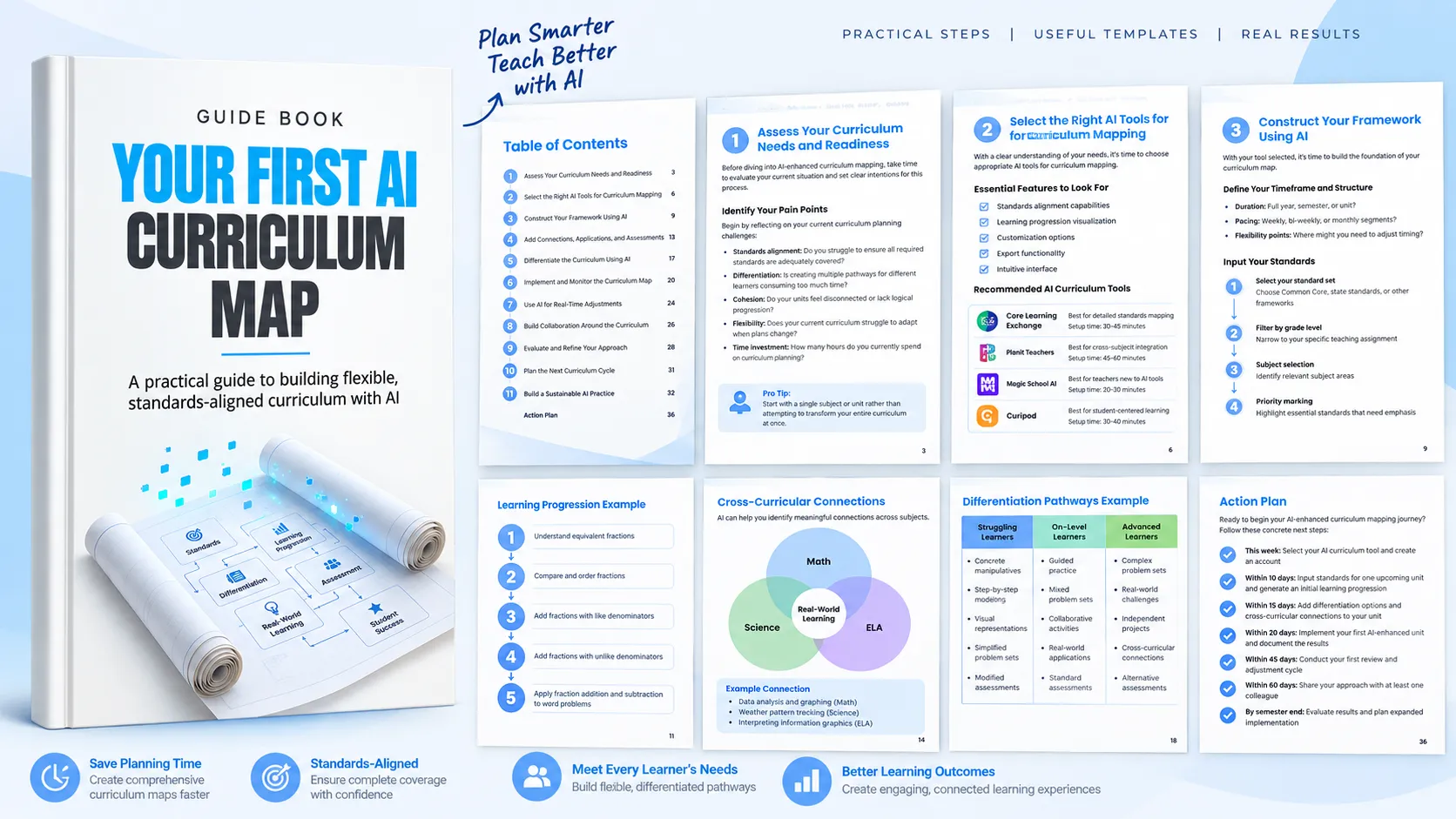
The guide provides a curriculum pain point analysis covering standards alignment, content progression, assessment design, differentiation, and cross-curricular connections. For each area, teachers can document the current challenge and its impact on both teaching and students.
Evaluate Your AI Readiness
AI readiness involves more than familiarity with technology. Consider your experience using AI for teaching tasks, the AI curriculum tools available through your school, the support available from colleagues or mentors, and whether you can dedicate time to the initial setup.
Define What Success Looks Like
Set clear objectives before starting. These may include saving time on curriculum planning, improving standards coverage, creating flexibility for changing classroom needs, or making the curriculum easier to share with other teachers.
Start small. The guide recommends beginning with a single subject or unit instead of attempting to transform an entire curriculum at once. This gives you an opportunity to learn the process before expanding it.
2. Select the Right AI Tool for Curriculum Mapping
Once your needs are clear, evaluate AI curriculum tools according to the capabilities that matter most to your planning process.
Features to Look For
- Standards alignment: The ability to map content to educational standards.
- Learning progression visualization: A way to understand how concepts build upon one another.
- Customization: Options for adapting AI suggestions to your teaching approach.
- Export functionality: The ability to share curriculum work with colleagues, students, or parents.
- Intuitive interface: A manageable learning curve for teachers.
Tools Discussed in the Guide
The guide identifies several AI curriculum tools and describes the use cases it associates with each:
- Core Learning Exchange's AI-Enabled Standards Alignment Services: Presented as an option for teachers who need detailed standards mapping. The guide lists a setup time of approximately 30 to 45 minutes.
- Planit Teachers' AI Curriculum Map Aligner: Presented for cross-subject integration, with a listed setup time of approximately 45 to 60 minutes.
- Magic School AI: Presented as an option for teachers new to AI tools, with built-in differentiation options and a listed setup time of approximately 20 to 30 minutes.
- Curipod: Presented for interactive curriculum planning with an emphasis on student engagement, with a listed setup time of approximately 30 to 40 minutes.
The guide also provides a tool selection worksheet. Teachers can rate tools from 1 to 5 across standards alignment, ease of use, differentiation features, collaboration options, and cost, then record which tool best matches their needs. It recommends testing the top choices before committing to one platform.
3. Construct Your Curriculum Framework Using AI
After selecting a tool, establish the basic structure of your curriculum map.
Define the Timeframe and Structure
Decide whether you are building a full-year, semester, or unit framework. Then determine how the curriculum will be divided, such as weekly, bi-weekly, or monthly segments. Identify potential flexibility points where pacing may need to change.
Input Your Standards
Standards provide the foundation for an aligned curriculum map. The guide recommends selecting the relevant standard set, filtering by grade level, choosing the subject area, and marking priority standards that require particular emphasis.
For example, the guide demonstrates a 5th-grade mathematics setup using Common Core State Standards, grade level 5, mathematics, and priority standards covering fractions and decimal operations.
Generate Learning Progressions
Ask the AI tool to identify prerequisites and show how concepts build upon one another. Then review the resulting sequence carefully. Look for missing prerequisites, gaps, or sequences that do not make instructional sense.
The guide's fraction example illustrates a progression from understanding equivalence to adding fractions with unlike denominators and then applying fraction addition and subtraction to word problems.
Build Flexibility Markers
Ask the AI tool to identify points where pacing may need adjustment. Add review days or flexible periods and create alternative pathways for different scenarios.
An effective approach is to use if-then scenarios. For example, if students master a concept quickly, the curriculum can move toward a more advanced application. If students struggle, additional modeling or practice can be introduced.
4. Add Connections, Applications, and Assessments
A strong curriculum map should do more than sequence standards. It should also reveal relationships between concepts and subjects and show where learning can be connected to authentic situations.
Create Cross-Curricular Connections
AI can be used to identify overlapping concepts or complementary skills across subjects. Teachers can input related subjects, request a connection analysis, and then select the connections that are appropriate for implementation.
The guide provides examples connecting 5th-grade mathematics concepts with science, English language arts, and social studies. Data analysis and graphing, for example, can connect with weather pattern tracking, interpreting information graphics, and population changes in historical periods.
Integrate Real-World Applications
Ask AI to suggest authentic contexts for important concepts, then adapt those suggestions to the local community and identify opportunities for extended projects.
For fraction operations, examples in the guide include cooking and recipe adaptation, building projects involving measurement and material division, budgeting allowance or fundraiser money, and art projects using proportional elements.
Add Strategic Assessment Points
Assessment can be built directly into the curriculum map. Ask AI to suggest logical assessment points, balance formative and summative approaches, and verify that assessments connect to specific learning objectives and standards.
The guide's fraction unit example progresses from an exit ticket and digital quiz to partner problem-solving and a project checkpoint, followed by a unit test.
Assessment results can also become pivot points. If a large majority of students demonstrates mastery, instruction can move forward. If mastery is lower, the curriculum can shift toward additional practice or alternative instructional approaches.
5. Differentiate the Curriculum Using AI
AI can help build differentiation directly into curriculum planning by generating alternative pathways for learners with different levels of readiness.
Create Multiple Learning Pathways
Begin by identifying concepts where students commonly demonstrate different levels of readiness. Ask AI to generate alternative approaches, then review those options to ensure they remain appropriate and maintain the necessary rigor.
The guide's decimal operations example includes pathways for struggling learners, on-level learners, and advanced learners. These pathways vary instructional approaches, materials, and assessment adjustments while addressing the same broader learning objective.
Build Scaffolding and Extensions
Ask AI to generate progressive support options for students who need additional assistance and extension activities for students who master content quickly.
For reading comprehension, the guide provides examples such as pre-highlighted text, graphic organizers, sentence stems, inference guides, guided questions, simplified text versions, comparative analysis, and perspective-based writing.
Personalize Learning Goals
Personalization can also be incorporated into the structure of the curriculum. Create goal templates, identify appropriate opportunities for student choice, and add reflection points.
A learning goal template can include the core objective, the student's current level, a target skill, evidence of successful mastery, and strategies that work for the learner.
6. Implement and Monitor the Curriculum Map
Creating the map is only the beginning. The guide recommends using a structured implementation process so that the curriculum can be refined based on actual classroom experience.
Create an Implementation Timeline
The guide presents an example sequence beginning with framework setup, followed by early adjustments, a first-quarter review, and mid-year planning. AI tasks include generating an overview, analyzing student data, suggesting pacing changes, evaluating progress, and generating enrichment or remediation materials.
Teacher responsibilities remain important throughout the process, including setting priorities, gathering resources, observing student needs, reflecting on progress, preparing interventions, and updating goals.
Prepare Launch Materials
- Generate starter assessments to establish baselines.
- Develop detailed plans for the first teaching sequence.
- Create communication templates for stakeholders.
- Establish systems for monitoring curriculum effectiveness.
Establish Monitoring Protocols
The guide recommends weekly check-ins, monthly data reviews, and quarterly reflections.
A weekly review can ask whether the class is on pace, which standards were addressed, which students need intervention, which students need extension activities, and what adjustments should be requested from the AI tool for the following week.
7. Use AI for Real-Time Curriculum Adjustments
The curriculum map becomes more useful when it is treated as a framework that can respond to classroom evidence rather than a fixed document.
Feed Performance Data Back Into the System
Provide formative and summative assessment results to the AI tool, ask it to identify patterns and learning gaps, and request targeted intervention suggestions.
The guide demonstrates this with a fraction assessment in which the teacher asks for several reteaching approaches after identifying difficulty with common denominators. The request also specifies a preference for practice activities using visual models.
Adjust Pacing
Compare actual progress with the planned schedule. If instruction takes longer or shorter than expected, ask AI to recalibrate upcoming plans while preserving essential content and critical standards.
Generate Supplementary Resources
When existing materials do not meet emerging needs, identify the resource gap and request targeted materials. New resources can then be differentiated for different learning levels.
The guide also recommends maintaining a curriculum adjustment log. Recording changes throughout the year can provide useful insights for future planning and reveal patterns in student learning needs.
8. Build Collaboration Around the Curriculum
AI-enhanced curriculum mapping can extend beyond individual planning.
Share the Approach With Colleagues
Teachers can create shareable summaries, demonstrate their workflow, and develop starter templates that make it easier for colleagues to experiment with AI-enhanced curriculum mapping.
Collaborate on Curriculum Development
AI can help combine inputs from multiple teachers, generate suggestions that reconcile different instructional approaches, and create shared assessment systems with flexibility built in.
The guide illustrates this with a team of 4th-grade teachers who have different teaching styles. AI is used to create a unit plan that incorporates elements of each approach while maintaining consistent learning objectives and assessments.
Involve Students
Student participation can be adapted to different age groups. Younger students can use simple visual progress tracking and basic choices, while older students can participate in goal creation, reflection, alternative assessment methods, personal learning plans, and progress monitoring.
The guide also recommends using age-appropriate learning journey maps so students can visualize their progress through the curriculum.
9. Evaluate and Refine the Approach
Systematic evaluation helps the curriculum map improve over time.
Conduct Formal Reviews
At mid-year and end-of-year review points, gather assessment results, pacing information, and usage patterns. Ask AI to analyze strengths, weaknesses, and patterns, then generate specific improvement suggestions.
Useful evaluation questions include:
- How closely did actual instruction align with the planned curriculum?
- Which standards were mastered by most students, and which fell below the guide's 80% threshold?
- Where did pacing differ significantly from the plan, and why?
- Which differentiation strategies were most effective?
- What resource gaps appeared during implementation?
Refine Your AI Prompts
The quality of AI-assisted curriculum work can also improve as teachers learn which prompts produce useful results. Review successful prompts, analyze less successful interactions, and maintain a personal prompt library.
The guide demonstrates how a broad request such as creating a lesson can be improved by specifying grade level, standard, timeframe, lesson components, and instructional requirements. Similarly, requests for improvement become more useful when they include assessment data, student needs, standards, and specific desired outcomes.
10. Plan the Next Curriculum Cycle
Use the experience from one curriculum cycle to improve the next. Document what worked well, identify challenges, record workflow changes, and set specific goals for exploring additional AI capabilities.
The guide recommends creating a curriculum development journal to record insights throughout the year. Over time, this can help identify patterns in what works for a particular teaching style and student population.
11. Build a Sustainable AI Curriculum Practice
Sustainable AI use begins with a clear teaching philosophy.
Define Your AI Boundaries
Identify what you want AI to support and what you will continue to handle yourself. The guide emphasizes using AI to enhance human connection rather than replace it. Professional judgment, knowledge of students, and the teacher's role remain central.
AI can support routine tasks, provide multiple pathways to learning, and surface useful insights, while teachers remain responsible for evaluating whether those outputs fit their students and instructional goals.
Develop a Sustainable Learning Routine
The guide recommends a manageable monthly routine that balances exploration, practice, curriculum refinement, and community connection. One example includes reading about AI in education, trying a new feature, reviewing curriculum maps, and connecting with an AI education community.
The emphasis is on depth over breadth. Master core functions before continually adding new features or tools.
Document Your Journey
Maintain before-and-after examples, track time spent on tasks with and without AI assistance, and collect evidence of student impact. A documentation framework can capture the curriculum area, previous approach, AI-enhanced approach, time saved, observed quality differences, student impact, and goals for the next iteration.
The guide suggests creating an AI success portfolio containing successful curriculum examples and notes about what made them effective.
Start Small and Build From Experience
AI-enhanced curriculum mapping is presented in this guide as an ongoing process rather than a one-time technology change. The practical starting point is deliberately small: select one subject or unit, build an initial framework, test the approach, observe what happens, and refine it.
From there, the process can expand to include standards alignment, learning progressions, flexible pacing, cross-curricular connections, real-world applications, assessment points, differentiation, collaboration, and student involvement.
The central principle is to treat AI as a tool that supports curriculum development and professional judgment. A curriculum map becomes more useful when it can evolve with the classroom rather than requiring the classroom to follow a fixed plan.
Action Plan
The guide concludes with a concrete implementation sequence:
- This week: Select an AI curriculum tool and create an account.
- Within 10 days: Input standards for one upcoming unit and generate an initial learning progression.
- Within 15 days: Add differentiation options and cross-curricular connections.
- Within 20 days: Implement the first AI-enhanced unit and document the results.
- Within 45 days: Conduct the first review and adjustment cycle.
- Within 60 days: Share the approach with at least one colleague.
- By semester end: Evaluate the results and plan expanded implementation.
The objective is not simply to create a curriculum map. It is to develop a repeatable process that can be reviewed, adjusted, documented, and improved with each curriculum cycle.