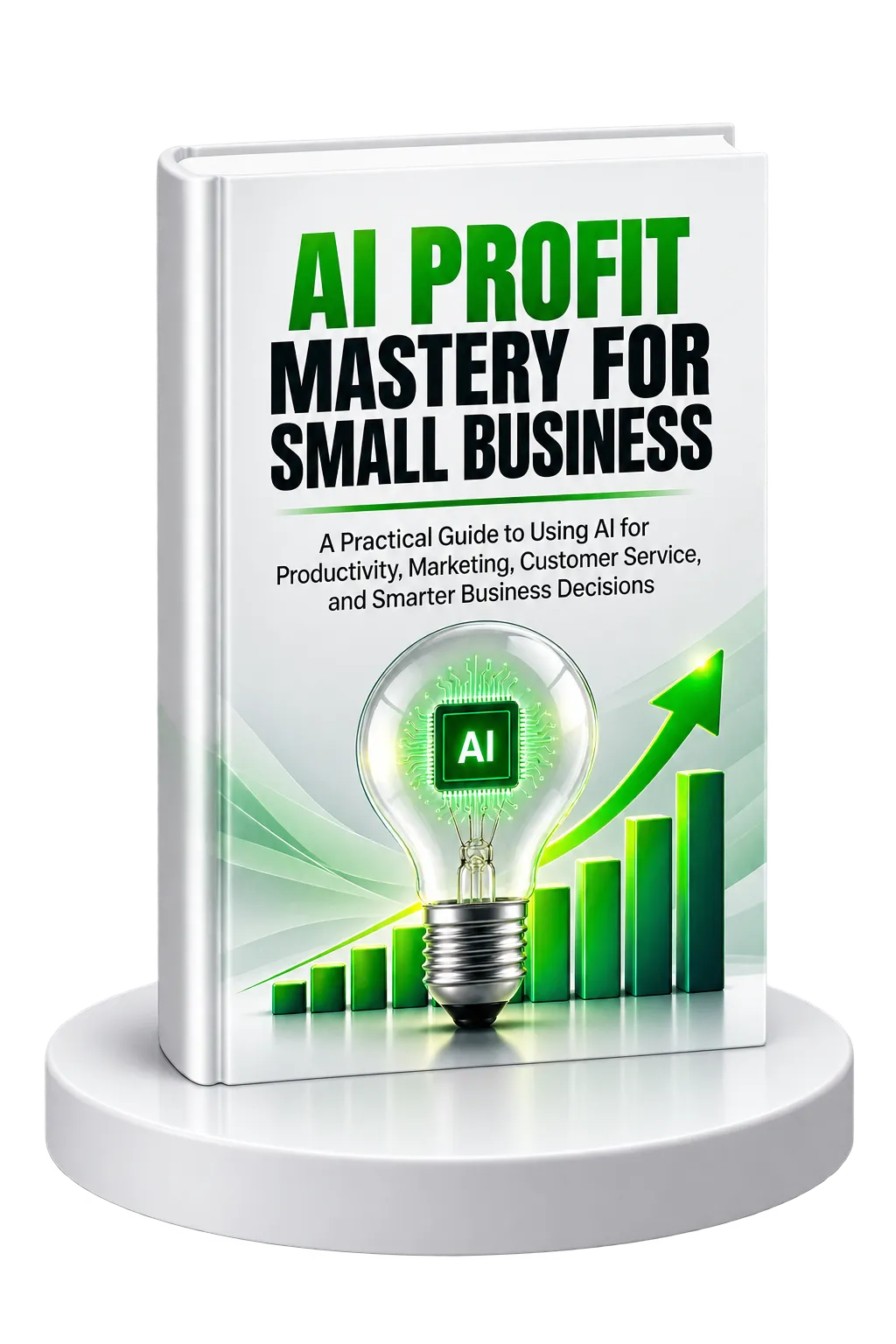
AI for Small Business: From Hype to Practical Business Value
Artificial intelligence can appear complicated when it is presented through technical terminology, emerging technologies, and constantly changing tools. AI Profit Mastery for Small Business takes a different approach. It focuses on the business problems AI can help solve and how small business owners can introduce these capabilities without trying to become technology experts.
The central idea throughout the resource is straightforward: AI should be evaluated according to the problems it solves, the time or money it can save, and the measurable value it can create. The goal is not to adopt every new AI tool. The goal is to identify practical opportunities where technology can improve the way the business operates.
Understanding AI, Machine Learning, and Automation
The resource distinguishes between several related technologies. AI can perform tasks such as writing, answering questions, and making recommendations. Machine learning uses data to improve its performance over time. Automation follows defined rules to complete repetitive tasks without requiring constant manual intervention.
For a small business, these capabilities can be applied in different ways. Simple automation can handle recurring processes such as sending emails or updating records. AI assistants can support writing, customer communication, and creative work. Predictive AI can use historical information to help forecast sales, inventory needs, or customer behavior.
The important point is that business owners do not need to understand the underlying technical details before they can identify useful applications. They need to understand what a capability can do, what problem it addresses, and whether the expected value justifies the cost.
Finding the Small Business AI Sweet Spot
Not every business task is an appropriate candidate for AI. The resource recommends looking for work that is predictable, repeated frequently, consumes meaningful amounts of time, and can be measured.
Seven areas highlighted as particularly suitable for small businesses are:
- Customer service responses
- Marketing content creation
- Appointment scheduling
- Invoice processing
- Inventory management
- Email marketing
- Basic bookkeeping tasks
A useful way to identify opportunities is to examine three areas of the business: tasks that are repeated in the same way, work that consumes time without requiring deep thinking, and processes where relatively small improvements could affect the bottom line.
This approach helps prevent AI adoption from becoming technology-driven. Instead of asking, “What AI tool should I buy?”, the business owner starts with, “What problem should I solve?”
The ROI Framework for AI Decisions
The resource recommends evaluating AI investments using the relationship between cost, time saved, and the value of that saved time. One method is to estimate an hourly value by dividing desired annual income by approximately 2,000 working hours.
For example, the resource uses a $100,000 annual income target to illustrate a $50 hourly value. If an AI tool saves five hours each week, those saved hours represent $250 of weekly time value.
The guide also provides cost and time-saving benchmarks for different investment levels. Lower-cost tools that save several hours each week may offer rapid payback, while higher-cost tools require greater time savings or business impact to justify their expense.
The underlying principle is to evaluate the complete economic picture rather than looking only at a tool's subscription price.
Getting Started Without Getting Overwhelmed
The number of available AI tools can make implementation difficult before it even begins. The resource recommends starting with a simple assessment rather than attempting to evaluate every available option.
Identify:
- The task that consumes the most time each week.
- The process where mistakes happen most often.
- The area where a small improvement could have the biggest impact on revenue.
Once a problem has been identified, the selected tool should integrate with existing software, provide measurable results, fit within the implementation timeline, and deliver enough value to justify its cost. Ease of learning is also important because a steep learning curve can delay results.
The resource recommends organizing business data before implementing AI. Customer information should be consolidated, outdated contacts removed from email lists, and existing processes documented so the business understands what the AI solution needs to accomplish.
The recommended starting point is deliberately small. A business struggling with customer emails might begin with an AI writing assistant. A business experiencing scheduling problems might begin with an AI booking system. The goal is to master one solution before adding another.
Automating Repetitive Business Work
Manual work creates a hidden cost beyond the hours spent completing it. Time used for repetitive administrative tasks is time that cannot be spent on marketing, customers, product improvements, strategy, or other higher-value activities.
The resource introduces an Automation Audit Method based on tracking how time is actually spent. For one week, business owners are encouraged to record the tasks they perform and the amount of time each task requires without changing their normal behavior.
Repeated email responses, data entry, appointment scheduling, lead follow-up, and invoice creation are examples of activities worth examining.
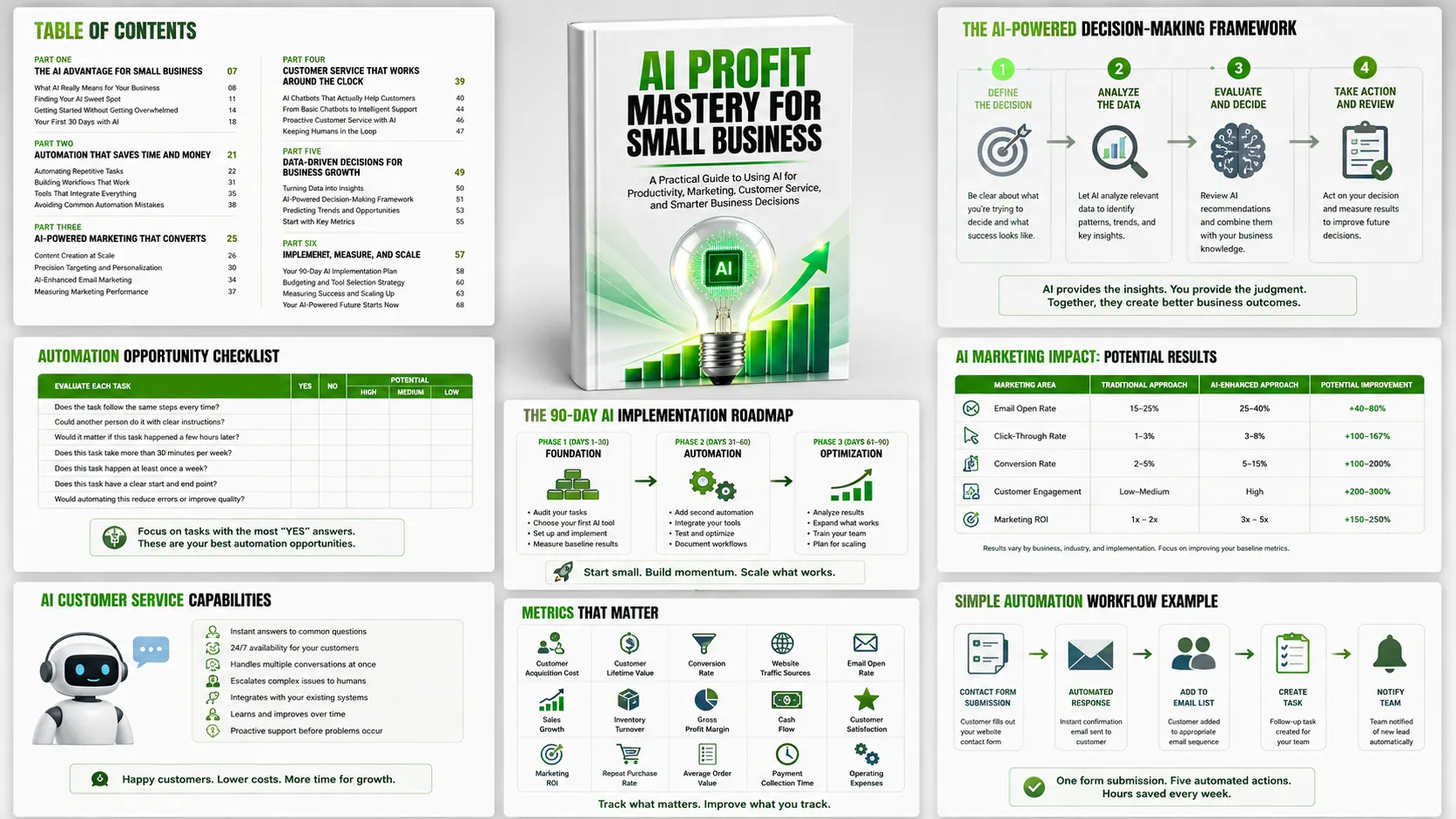
Three Questions for Identifying Automation Opportunities
- Does the task follow the same steps every time?
- Could another person complete it using clear instructions?
- Would it matter if the task happened a few hours later rather than immediately?
When the answer to these questions is yes, the task may be a strong automation candidate.
Simple Automations to Start With
The resource highlights email marketing automation, social media scheduling, and invoice automation as practical starting points. Automated welcome messages and customer follow-up sequences can maintain communication without requiring manual intervention for every message.
Social media scheduling can consolidate content preparation into a planned workflow. Invoice automation can create invoices, send them, and issue payment reminders based on defined events.
The resource also describes more advanced workflow automation. A website contact form, for example, can trigger updates to an email list, customer database, task system, and lead notification process. CRM integrations can support follow-up based on customer behavior, while inventory automation can respond to low stock levels and new product arrivals.
Automate the Process, Not the Problems
One of the resource's strongest implementation principles is that businesses should not automate broken processes. If a process does not work well manually, automation can simply make the underlying problems happen faster.
The recommended approach is to map and improve the process first, automate one area at a time, preserve human involvement where personal interaction matters, and test automated workflows regularly.
Using AI to Improve Marketing
AI can support marketing by combining content creation, audience analysis, personalization, analytics, and ongoing campaign optimization.
Content Creation at Scale
The resource describes how AI can support multiple content formats, including blog posts, social media content, email newsletters, product descriptions, and advertising copy.
A major recommendation is to teach AI the business's brand voice. Providing successful content examples, key messages, tone preferences, and communication guidelines helps create output that is more consistent with the organization's existing communication style.
AI can also analyze high-performing content and identify patterns worth applying to future campaigns. For example, successful social posts or email subject lines can provide signals about the types of content and messaging that resonate with an audience.
AI-Powered Content Planning
AI can help create content calendars by considering business dates, promotions, industry trends, customer behavior, preferred content formats, and engagement patterns.
The resource uses Cosabella's experience with the AI platform Albert as an example of AI being used for social media content creation and optimization. The example illustrates the broader principle of using performance information to inform future content rather than relying entirely on intuition.
Precision Targeting and Personalization
AI can analyze customer behavior to identify patterns in website activity, product interest, content engagement, and purchasing behavior. This can support audience segmentation and the creation of lookalike audiences based on behavioral similarities.
Behavioral targeting also allows businesses to distinguish between different levels of customer intent. Someone repeatedly visiting a website without purchasing may require a different message from someone who completes a purchase immediately.
The resource also describes real-time campaign optimization, where AI can shift attention toward better-performing advertisements and away from weaker ones based on performance data.
AI-Enhanced Email Marketing
AI can segment subscribers according to behavior, interests, and purchasing history rather than sending identical messages to everyone. It can also personalize delivery timing, test subject lines, recommend relevant products, and adapt automated sequences according to subscriber interactions.
The resource presents industry benchmarks and AI-enhanced performance examples to illustrate the potential impact of greater personalization. The broader lesson is that relevance matters: the more closely a message matches a subscriber's interests and behavior, the more useful the communication can become.
Measuring Marketing Performance
AI analytics can bring together metrics such as customer acquisition cost, customer lifetime value, conversion rates, email engagement, social media performance, advertising efficiency, website behavior, and sales attribution.
Instead of focusing only on surface-level engagement, the resource encourages businesses to connect marketing activities with actual business outcomes. AI can also help identify patterns in historical performance and provide forecasts based on current trends.
Building Customer Service That Works Around the Clock
Customer service is another area where AI can reduce repetitive workload while improving availability. AI chatbots can handle routine questions so human team members can focus on complex or sensitive situations.
Common questions suitable for automated handling include:
- Business hours and location
- Product and service pricing
- Refund and return policies
- Order procedures
- Delivery timeframes
- Discounts and promotions
- Payment methods
- Contact information
- Stock availability
The resource emphasizes that customer service AI should reflect the business's existing brand voice. Before launch, businesses should test conversations, act as customers, review responses, and adjust the system until interactions are natural and helpful.
From Basic Chatbots to Intelligent Support
More advanced AI customer service systems can access customer information, provide order updates, check account details, and connect with other business systems.
Integration can extend the usefulness of customer service AI. A system connected to scheduling software can help book appointments. Integration with inventory systems can provide availability information, while connections to payment systems can support certain simple transactions.
The resource also distinguishes between reactive and proactive customer service. Reactive service responds after customers ask for help. Proactive service identifies potential problems or opportunities and reaches out before the customer asks.
Keeping Humans in the Customer Service Loop
AI is not presented as a replacement for human judgment. Routine and factual requests are well suited to AI, while emotional situations, complex problems, unusual requests, and situations requiring judgment may need human attention.
Smart systems should therefore recognize when to transfer a conversation to a person. Human team members should also understand what the AI can and cannot do and contribute feedback that improves the system over time.
Turning Business Data Into Better Decisions
Small businesses generate data through sales, customer interactions, website activity, inventory, marketing, and financial operations. The challenge is often not a lack of information but the difficulty of turning scattered information into useful answers.
The resource separates three related concepts. Business intelligence turns raw data into useful information. Analytics examines what happened and why. Predictive modeling uses existing patterns to help forecast what may happen next.
AI can continuously analyze large amounts of information and identify patterns that may be difficult to detect manually.
Metrics That Matter
The resource recommends tracking metrics that have a direct relationship with business performance. These include customer acquisition cost, customer lifetime value, recurring revenue, growth trends, inventory turnover, website conversion rates, traffic sources, email performance, social engagement, employee productivity, cash flow, payment collection, campaign performance, customer satisfaction, and operating costs.
The objective is not simply to collect more data. The objective is to use data to understand business health, identify problems, and discover opportunities.
The AI-Powered Decision-Making Framework
The resource presents a four-step approach to using AI for business decisions:
- Define the decision. Clearly identify what needs to be decided and what success looks like.
- Gather and analyze relevant data. Look for patterns, trends, and anomalies that could influence the decision.
- Evaluate AI recommendations alongside business knowledge. AI can provide data-driven suggestions, but business owners bring knowledge of their customers and circumstances.
- Take action and evaluate the result. Use the outcome to improve future decisions and refine the process.
This framework positions AI as a decision-support capability rather than an authority that should replace business judgment.
A Practical 90-Day AI Implementation Roadmap
The resource's implementation roadmap is designed to prevent businesses from purchasing multiple tools and attempting to implement everything simultaneously. Instead, it divides the journey into three phases.
Phase 1: Foundation, Days 1–30
The first month focuses on assessment and quick wins. Business owners identify time-consuming tasks, audit existing processes, establish a baseline, select a first AI tool, implement it, and document the results.
The four-week progression is built around auditing, selecting, implementing, and refining the first solution.
Phase 2: Automation, Days 31–60
The second month expands successful implementation. A second automation can be introduced, followed by integration between tools. Testing and optimization then ensure the workflows operate correctly before further expansion.
The emphasis is on choosing complementary tools rather than creating a collection of disconnected systems.
Phase 3: Optimization, Days 61–90
The final phase focuses on measuring results, expanding successful automations, introducing more advanced capabilities where appropriate, and training the team.
The resource suggests using the final weeks to determine which processes still need improvement and to create the roadmap for the next 90 days.
Budgeting and Choosing the Right AI Tools
The resource provides three investment levels as a framework for thinking about AI spending:
- Starter: $50–$150 per month, covering examples such as email automation, basic chatbots, and scheduling tools.
- Growth: $150–$400 per month, including advanced automation, CRM integration, content creation, and analytics.
- Scale: $400–$800 per month, covering predictive analytics, advanced AI tools, and enterprise integrations.
The guide recommends beginning at the starter level unless there is a clear reason to require advanced capabilities. Businesses should consider the goal they want to achieve, the team's technical skills, integration requirements, measurable success criteria, and the opportunity to test a tool before committing to a long-term contract.
Tool selection should also account for training and setup time rather than focusing only on subscription costs.
Preparing the Team for AI Adoption
Technology alone does not determine implementation success. Team understanding and adoption are equally important.
The resource recommends explaining how AI helps employees, particularly by removing repetitive work and allowing them to spend more time on valuable activities. Hands-on training using real business scenarios can make adoption more practical.
AI champions can also help colleagues learn new systems. Teams should document new workflows, share successful examples, and develop skills in prompt writing, chatbot improvement, data interpretation, process optimization, and troubleshooting.
Measuring Success and Scaling Responsibly
AI initiatives should be measured from the beginning. The resource recommends starting with time savings because they are relatively straightforward to quantify. Quality improvements should also be monitored, followed by direct and indirect revenue impact.
Successful automations should be expanded before adding unnecessary new technologies. A business that has proven the value of an email automation system, for example, can consider expanding its use before introducing another unrelated tool.
The resource identifies several common implementation obstacles, including integration problems, team resistance, budget overruns, and poor data quality. The recommended responses are to verify integrations and data formatting, simplify workflows, provide ongoing support, control the pace of tool adoption, and clean data before implementing advanced capabilities.
Building an AI-Ready Business for the Long Term
AI implementation does not end after the first successful automation. New tools and capabilities continue to appear, making evaluation an ongoing business activity.
The resource recommends staying informed without attempting to adopt every new technology. Business owners should follow trusted sources, learn about developments that are relevant to their businesses, and focus on tools that address real problems.
Advanced applications discussed in the resource include customer behavior prediction, automated inventory management, voice-activated assistants, AI video creation, predictive maintenance, AI-supported hiring and scheduling, financial forecasting, and budget optimization.
These capabilities should be considered after the fundamentals are established. The resource repeatedly returns to the principle that steady progress is preferable to rushing into complex implementations.
The Next Step: Start Small and Build From Results
The final message of AI Profit Mastery for Small Business is action-oriented. Reading about AI is only the beginning. The recommended next step is to select one simple tool that addresses a genuine business problem and begin building experience through a manageable implementation.
During the first 30 days, establish the foundation. During the next 30 days, expand and optimize. By 90 days, connect successful systems, evaluate the return on investment, and determine where further investment makes sense.
The resource also encourages business owners to share what they learn with their teams and, where appropriate, with other business owners. Building knowledge and relationships around practical AI adoption can reinforce learning and create opportunities for collaboration.
The overall approach is deliberately incremental: identify a real problem, choose an appropriate solution, measure the outcome, improve the process, and then build on what works.