Create AI Chatbots that engage,
assist, and convert visitors.
AI Chatbot enables you to build intelligent, fully customizable chatbots that provide instant responses, personalized recommendations, and real-time customer engagement across your website. Powered by leading AI models from OpenAI, Anthropic, Gemini, and xAI, every chatbot can be tailored to your brand while seamlessly integrating into your existing digital experience without technical complexity.
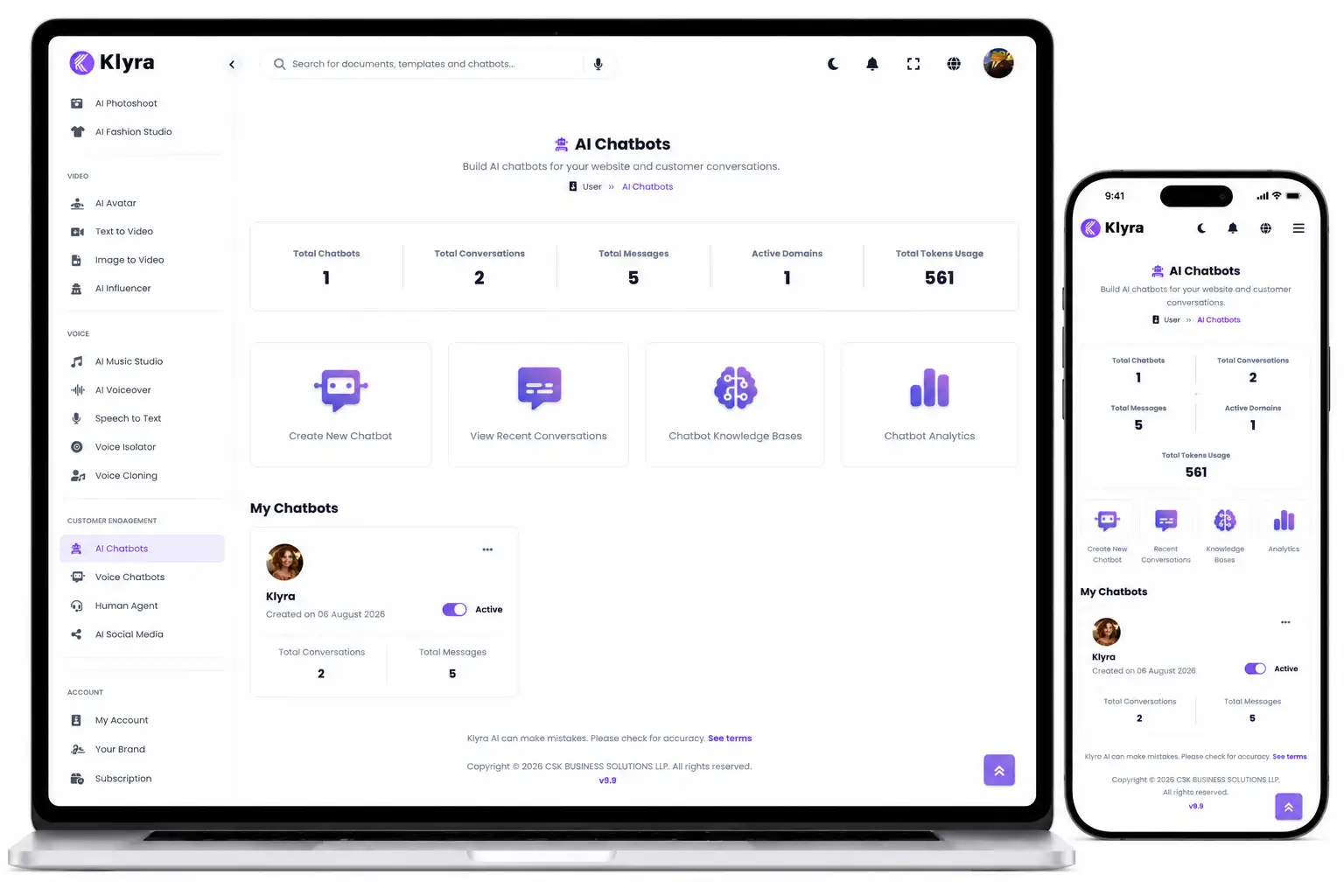
Every visitor deserves an
instant conversation.
AI Chatbot transforms your website into an intelligent customer engagement platform. From answering questions and recommending products to guiding visitors through their journey, every interaction happens instantly, creating experiences that feel responsive, personal, and effortless.
Answer instantly.
Deliver immediate answers to visitor questions without making customers search through pages or wait for assistance, helping every interaction move forward naturally.
Personalise every interaction.
Provide tailored recommendations and contextual responses that help visitors discover the right information while creating a more engaging customer experience.
Guide every visitor.
Help users navigate your website, discover products or services, and complete their journey with confidence through intelligent conversational guidance.
Choose the intelligence
that fits your business.
AI Chatbot supports leading models from OpenAI, Anthropic, Gemini, and xAI, giving businesses the flexibility to choose the AI that best matches their performance, quality, and business requirements while keeping the customer experience consistent.
Every business is different.
Your chatbot should be too.
AI Chatbot gives you complete control over how your chatbot looks, behaves, and evolves. Create experiences that reflect your brand, engage visitors naturally, and adapt as your business grows without compromising consistency.
An experience that feels like your brand.
Customise colours, logos, avatars, and chatbot appearance so every interaction feels like a natural extension of your website instead of a third-party widget.
One business.
Multiple chatbots.
Build multiple AI chatbots for different products, services, departments, websites, or customer journeys, giving every audience a dedicated conversational experience.
Improve continuously.
Continue training your chatbot as customer expectations evolve, ensuring conversations remain relevant, helpful, and aligned with your latest business needs.
Welcome every visitor with confidence.
Create personalised welcome messages that immediately engage visitors, introduce your business professionally, and encourage meaningful conversations from the very first interaction.
Technology should adapt to your business. Not the other way around.
AI Chatbot combines complete brand customisation, unlimited chatbot creation, adaptive learning, and personalised experiences into one intelligent platform, giving every business the flexibility to create conversations that genuinely reflect their brand.
Choose the intelligence.
Keep the experience consistent.
Every business has different AI requirements. AI Chatbot supports multiple leading AI providers while giving your customers one seamless conversational experience that reflects your brand, not the underlying model.
OpenAI
Build conversational experiences using OpenAI models while managing everything from one chatbot platform.
Anthropic
Choose Anthropic models while maintaining the same professional chatbot experience across your business.
Gemini
Power your chatbot with Gemini models without changing how customers interact with your brand.
xAI
Select xAI models to support your conversational workflows while keeping deployment simple and consistent.
From creation to deployment.
Without technical barriers.
AI Chatbot is designed for quick website integration. Embed your chatbot into your website with a straightforward implementation process so you can begin engaging visitors without unnecessary technical complexity.
Your AI strategy can evolve without rebuilding your chatbot.
AI Chatbot separates the customer experience from the underlying AI provider, giving your business the freedom to choose supported models while maintaining a consistent conversational experience for every visitor.
Every conversation
becomes actionable insight.
Great chatbots don't just answer questions. They reveal how customers interact with your business. AI Chatbot Analytics brings every important metric together in one intuitive dashboard, helping you measure engagement, optimise performance, and make smarter business decisions.
Activity Trends
Monitor engagement over time to understand how visitors interact with your chatbot and identify patterns that support better business decisions.
Token Insights
View token distribution and chatbot token consumption to better understand resource usage and optimise how AI is utilised across your organisation.
Usage Statistics
Analyse chatbot usage and model distribution to understand interaction patterns and continuously improve customer engagement.
Channel Performance
Compare chatbot performance across supported channels to understand where conversations are delivering the greatest business impact.
Top Domains
Identify the websites and domains generating the most valuable chatbot interactions so you can focus on what drives engagement.
Conversation Analysis
Explore detailed chat histories to understand customer behaviour, uncover opportunities for improvement, and refine your chatbot experience with confidence.
Measure what matters.
Improve what matters most.
AI Chatbot Analytics transforms raw conversation data into meaningful business intelligence. Understand engagement, optimise chatbot performance, allocate AI resources more effectively, and continuously improve customer experiences from one comprehensive analytics dashboard.
When AI reaches its limit,
people take over.
Not every conversation should remain automated. Human Agent creates a seamless transition from AI to live support, ensuring visitors receive personal assistance whenever a conversation requires human expertise, empathy, or deeper problem solving.
Automation when possible.
Human support when needed.
AI Chatbot handles routine conversations instantly, while Human Agent ensures complex questions can be transferred to a live support representative without disrupting the customer experience.
Conversations continue naturally, even after AI hands them over.
Human Agent bridges the gap between intelligent automation and personalised support, allowing businesses to deliver responsive customer service without forcing visitors to start their conversation again.
Agent Status
Human agents can control their availability by switching their status on or off whenever they're ready to assist customers.
Real-Time Notifications
Receive instant notifications when visitors request human assistance, allowing agents to quickly accept and continue conversations.
Custom Away Messages
Display personalised messages whenever human agents are unavailable while allowing AI to continue assisting visitors automatically.
Escalation Timeout
Configure how long visitors should wait for a live agent before they're offered the option to continue with AI assistance.
Trigger Phrases
Define your own escalation phrases or use the default triggers to determine exactly when conversations should be transferred to a human agent.
AI + Human Collaboration
AI Chatbot and Human Agent work together to create one continuous customer journey, combining automation with human expertise whenever the situation demands it.
More conversations.
Better customer outcomes.
AI Chatbot helps businesses engage every visitor, answer questions instantly, uncover valuable customer insights, and seamlessly transition to live support whenever required. It's customer engagement designed for modern businesses.
Respond instantly.
Provide immediate answers to customer questions, reducing waiting time while delivering a faster and more satisfying experience across every interaction.
Improve continuously.
Use analytics, conversation history, and adaptive training to refine chatbot performance and continually improve customer engagement.
Never leave customers waiting.
When conversations require human expertise, seamlessly transition visitors to live agents without interrupting their customer journey.
Customer engagement has evolved.
One intelligent chatbot.
Every visitor supported.
AI Chatbot combines intelligent conversations, adaptive learning, comprehensive analytics, and seamless human collaboration into one connected customer engagement platform. The result is faster responses, better insights, and stronger customer relationships, all from a single solution.
AI Chatbot is one AI App.
Klyra AI is where your business works.
Customer conversations are only one part of running a business. AI Chatbot works alongside the other AI Apps inside Klyra AI, allowing your conversations, content, creativity, automation, and business knowledge to stay connected inside one intelligent workspace.
Engage every visitor.
Deliver intelligent conversations that welcome visitors, answer questions, provide recommendations, and support customers from their very first interaction.
Turn conversations into insights.
Use analytics to understand customer behaviour, monitor engagement, improve chatbot performance, and make informed decisions that strengthen future interactions.
Build without switching platforms.
Continue your work inside Klyra AI by creating content, generating images, producing videos, automating workflows, and collaborating with your team from one connected platform.
Questions?
We've got answers.
Learn how AI Chatbot helps businesses deliver intelligent customer engagement while remaining part of Klyra AI, The AI Operating System.
What is AI Chatbot?
AI Chatbot enables businesses to create intelligent, fully customisable website chatbots that answer questions, engage visitors, provide personalised recommendations, and support customers in real time using leading AI models.
Which AI models does AI Chatbot support?
AI Chatbot supports leading models from OpenAI, Anthropic, Gemini, and xAI, allowing you to choose the AI that best fits your business while maintaining one consistent customer experience.
Can I customise my chatbot?
Yes. You can customise your chatbot's appearance with your own colours, logos, avatars, and personalised greetings, while continuously training it to better support your customers as your business evolves.
Does AI Chatbot include analytics?
Yes. Chatbot Analytics provides detailed insights including activity trends, token usage, chatbot performance, model usage distribution, channel performance, top domains, and conversation analysis to help you continuously optimise customer engagement.
Can conversations be transferred to a human agent?
Absolutely. Human Agent allows conversations to transition seamlessly from AI to a live support representative whenever human assistance is required, creating a smooth customer experience without interrupting the conversation.
Is AI Chatbot a standalone application?
No. AI Chatbot is one of the AI Apps inside Klyra AI. It works alongside your other AI Apps so customer engagement, content creation, automation, analytics, and collaboration all happen within one connected AI Operating System.